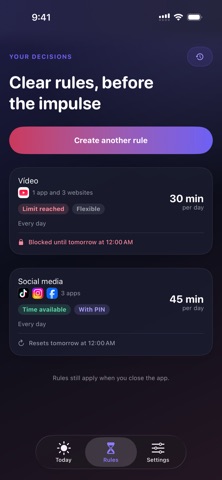
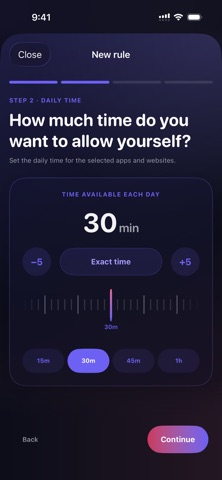
About this app
There are apps you open for a moment and, before you know it, you have spent far more time on them than you intended. DopaGuard helps you set your limits with a clear head: how much time you want to spend each day on the apps and websites you choose, including the ones that distract you most. When the limit runs out, they stay blocked until the next reset. You can create rules with one time limit shared across several apps and websites, or give each one its own limit. You also choose the days of the week when the rule applies and the exact reset time. When you create a rule, you can also reserve a one-time extension of 5, 10 or 15 minutes, available only after the limit runs out in case you genuinely need it. Once used, it does not renew. Protect your decision Keep a moment of impulse from undoing your limits with three protection modes: • Flexible: you can change or delete the rule whenever you want. • Strict: for the period you choose, you cannot reduce or delete the rule. • PIN: if you want to make a real commitment with someone else, you can let that person create and keep the PIN. Only they can approve relaxing or deleting a rule, or ending a Disconnect session early. Disconnect mode When you need to step away from distractions right now—during a meal, a family gathering, or any moment when you want to avoid acting on impulse—start Disconnect. Choose which apps and websites to block, when it should end and how strongly to protect it. A strict Disconnect session cannot be cancelled early; with a PIN, only the person who knows the code can stop it. Privacy and commitment You do not need to create an account. There is no analytics, advertising or tracking. Your rules, selections and history are stored only on your iPhone and are not shared with anyone. The app is completely free. If you would like to support its development and future, you can leave a voluntary tip from the app’s settings. It does not unlock extra features or change the protection; your support helps keep DopaGuard independent and improving.
Audience growth
Ratings growth
Baseline captured. Growth appears after the crawler observes a changed rating count.
Momentum comes from crawler snapshots for the tracked storefront. “Viral growth signal” means unusually fast recent rating gains; it is an indicator, not download data.
Price tracking
Price intelligence
First snapshot captured. The trend line starts after the next crawler price observation.
- First observed Aug 24, 2026 · 1:57 AM Free
Screenshots