About this app
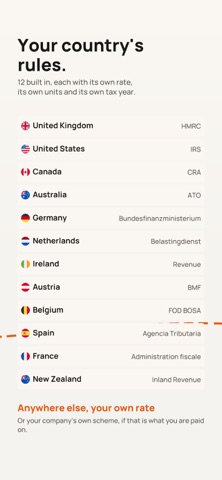
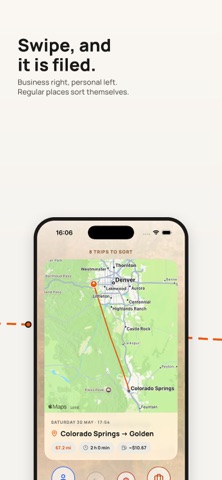
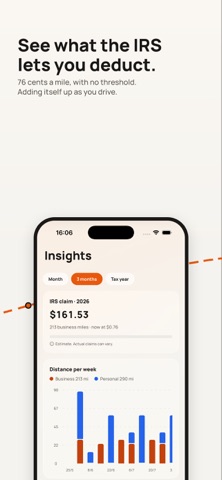
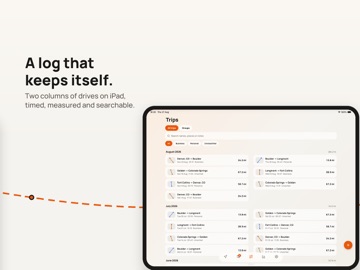
Milometry is a mileage and fuel log that keeps itself. It records your drives automatically, lets you sort them with a swipe, and works out what your business journeys are worth. No account, no subscription, and no copy of where you have been on anybody else's server. IT STARTS WITHOUT YOU Drive away from somewhere you parked and Milometry notices. It records the journey by itself and closes it once you have been still for a few minutes. Nothing to remember, nothing to press. Prefer to start it yourself? Ask Siri, hold the app icon for a shortcut, or set up an automation that starts a trip when your car's Bluetooth connects. A Live Activity keeps the running total on the Lock Screen and in the Dynamic Island, so you are never handling the phone while driving. If it ever misses one, it says so. Milometry finds the gaps between the journeys it did record and offers them back to you, rather than leaving a hole in the log you only notice at the end of the tax year. SWIPE, AND IT IS FILED New drives arrive as a deck of cards, each route drawn on the map so you can see which journey it was. Swipe right for business, left for personal. Name the office or a regular client once and journeys there sort themselves from then on. Related drives can be grouped together, and a heat map shows everywhere you have been. THE DEDUCTION ADDS ITSELF UP Business journeys are worked out at the the IRS rate of 76 cents a mile, adding up as you drive, across every vehicle you use. SEE WHAT DRIVING REALLY COSTS Log a fill-up: how much went in, what it cost, and the odometer reading. Between two full tanks Milometry works out your real MPG, then prices journeys with what your car actually does rather than the brochure figure. Parking, tolls, congestion and clean air charges attach to the journey they belong to, with a photograph of the receipt kept beside them. PAPERWORK, READY WHEN YOU ARE A statement for every month and a running total for the tax year, made as you go rather than assembled in a panic afterwards. Export the log as a CSV, the deduction as a PDF, or take a full backup. Coming from another app or a spreadsheet? Import a CSV, tell Milometry which column is which, and bring your history with you. MORE THAN ONE CAR Add every vehicle you drive. Each keeps its own fuel prices, its own economy and its own running costs, and each journey belongs to the one that made it. YOUR DRIVING STAYS YOURS There is no Milometry account and no Milometry server. Trips, routes, fill-ups, expenses and receipt photographs are held in your phone's own storage. There is no analytics and no advertising code in the app. Nothing is uploaded unless you send it somewhere yourself: a folder in Files or iCloud Drive, a drive on your own network over WebDAV, or Google Drive. You choose the destination, and you can choose none. For another layer, lock Milometry behind Face ID, Touch ID or your passcode. PAY ONCE One payment. No subscription, no tiers, no adverts, nothing to cancel. Buy it once and it is yours, including everything added later. BUILT FOR DRIVERS IN THE US Miles, real MPG, the IRS rates and the tax year the totals run on. Nothing to convert and nothing to translate in your head. Milometry also carries the rules for 11 other countries and reads in 6 languages, so it travels with you. Anywhere else, set your own rate or your company's scheme. Runs on iPhone and iPad. Deduction figures are estimates, meant to help you keep an accurate record. They are not tax advice. Check anything that matters with the IRS or with your accountant.
Latest release
What’s New
A drive recorded with no connection now has its start and end named as soon as you are back online, so an offline stretch no longer leaves places blank. When a drive ends by itself, the notification tells you where it finished, so you can see which trip it is without opening the app. The map recentres on where you are each time you open the Track screen. A storage screen shows what the app is using and where it goes. You can drop the map lines from old trips and the photographs from old receipts to free space up, and every distance, date and figure stays exactly as it was. You are told when a new version is out, and you can skip it.
Audience growth
Ratings growth
Baseline captured. Growth appears after the crawler observes a changed rating count.
Momentum comes from crawler snapshots for the tracked storefront. “Viral growth signal” means unusually fast recent rating gains; it is an indicator, not download data.
Price tracking
Price intelligence
First snapshot captured. The trend line starts after the next crawler price observation.
- First observed Sep 4, 2026 · 7:55 AM $9.99
Screenshots