About this app
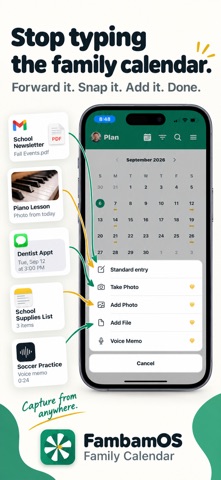
FambamOS is a shared calendar and task list built for how families actually receive information: school emails, screenshots of the practice schedule, a text from another parent about a time change. Most calendar apps assume you'll type all of that in yourself. FambamOS turns it into a proposed event or task instead — you just confirm it. HOUSEHOLD INBOX Forward an email, share a screenshot, or record a quick voice memo, and FambamOS proposes an event or task with the details already filled in: title, time, location, category. Nothing is ever added to your calendar automatically — you always review and confirm first. ONE SHARED CALENDAR AND TASK LIST Everyone in the household sees the same calendar and the same task list, with clear ownership: who's accountable for it, and who's actually doing it. Conflicts and double-bookings are flagged automatically. Handing something off to another family member takes one tap, and they're notified. ROUTINES AND MEAL PLANNING Save a routine once — like a school-morning checklist — and apply it in a tap whenever you need it. Plan the week's meals and turn them into a grocery list automatically, with ingredient suggestions for each meal so you're not starting from a blank list. BUILT FOR THE WHOLE FAMILY, INCLUDING KIDS WITHOUT THEIR OWN PHONE Add a child as a household member with just a name — no account or login required. An adult manages their schedule for them, right alongside everyone else's. FAMILY BOARD Turn a spare tablet into an always-on household display — everyone's day at a glance, right on the kitchen wall. NO ADS. EVER. FambamOS is a household subscription, not an ads business. We don't sell your data, and we never will. Free to start: shared calendar, tasks, and lists for up to 6 household members, plus 5 Household Inbox captures a month. Family Plus ($7.99/month or $59.99/year, with a 7-day free trial) unlocks unlimited Household Inbox captures, unlimited household members, routine templates, and fairness insights. Terms of Use (EULA): https://www.apple.com/legal/internet-services/itunes/dev/stdeula/
Latest release
What’s New
Minor updates and improvements.
Audience growth
Ratings growth
Baseline captured. Growth appears after the crawler observes a changed rating count.
Momentum comes from crawler snapshots for the tracked storefront. “Viral growth signal” means unusually fast recent rating gains; it is an indicator, not download data.
Price tracking
Price intelligence
First snapshot captured. The trend line starts after the next crawler price observation.
- First observed Sep 11, 2026 · 10:46 PM Free
Screenshots