About this app
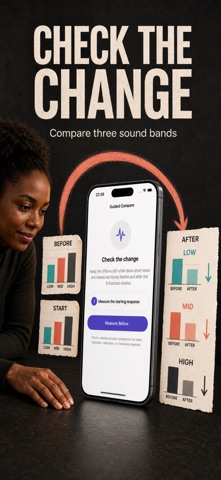
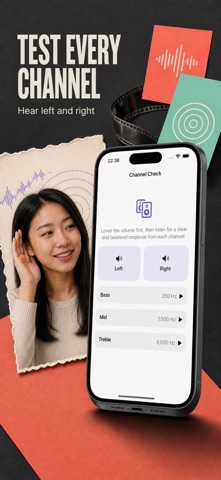
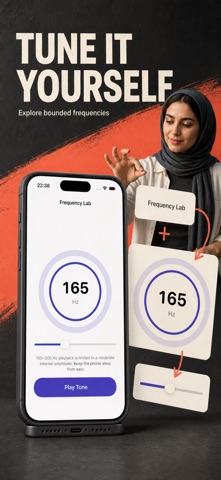
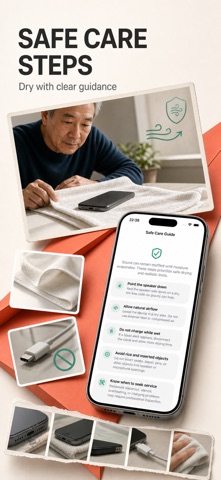
When an iPhone speaker sounds muffled after a splash, Water Eject provides a focused acoustic routine and clear care guidance. Quick Clean is free and unlimited. Controlled low-frequency sweeps play through the built-in iPhone speaker while you keep the speaker side facing down. QUICK CLEAN — FREE AND UNLIMITED Quick Clean runs a 30-second bidirectional sweep from 150 to 210 Hz with smooth ramps and an app-defined amplitude limit. Cleaning requires the built-in iPhone speaker route. If headphones, AirPods, Bluetooth audio, or a wired output is active, the routine stops and explains how to switch output safely. ENHANCED CLEAN — LIFETIME ACCESS Enhanced Clean is a 52-second four-stage routine with 120 to 240 Hz sweeps and pulsed frequency holds. It is 73% longer than Quick Clean and uses twice the sweep range. These are transparent routine differences, not a performance guarantee or repair claim. One lifetime purchase unlocks every diagnostic tool. There is no subscription. GUIDED BEFORE & AFTER COMPARISON Run a repeatable three-band probe before and after a routine. Water Eject reports relative low, mid, and high frequency change as Stronger, Similar, Lower, or Inconclusive. It never labels a speaker wet, dry, repaired, or damaged. Unreliable comparisons are rejected when conditions change. Microphone access is optional and requested only when you explicitly begin Guided Compare or Mic Check. Audio samples are processed temporarily on your device and are not saved. Raw buffers stay in memory only. If microphone access is unavailable, you can still record a manual Better, Same, or Worse result. Cleaning itself does not need microphone permission. SOUND TOOLS Explore a bounded low-frequency lab, speaker channel checks, and bass, mid, and treble test tones. Use left and right checks with connected headphones or AirPods, or make an optional voice microphone recording for playback. AirPods and other headphones are used only for diagnostic listening; water-ejection routines are never played to them. Speaker playback cannot clean a microphone. LOCAL HISTORY Keep a private on-device record of routine, duration, derived comparison summary, and your result rating. Raw microphone audio is never saved. Clear history inside the app with an explicit confirmation. SAFE CARE GUIDE Follow practical preparation and drying steps based on conservative device-care guidance: remove cases that trap moisture, disconnect cables, place the speaker side down, and allow airflow. Learn why you should avoid heat, compressed air, rice, and objects inserted into openings. The guide also explains liquid-alert precautions and when persistent distortion, charging trouble, heat, or other symptoms deserve professional service. IMPORTANT LIMITS Acoustic pulses may help move light moisture near an exposed speaker mesh, but results vary. Water Eject does not add liquid protection, repair liquid damage, remove packed debris, or affect microphone mesh through speaker playback. Allow drying time and seek qualified service when symptoms persist. DESIGNED FOR CONTROL AND PRIVACY Playback stops on route changes, interruptions, calls, and backgrounding. Water Eject works without an account and does not upload microphone recordings. Choose your in-app language at any time, including right-to-left languages. Unlock lifetime access once to add Enhanced Clean, Guided Compare, manual frequency tools, speaker and headphone checks, microphone playback check, and local history. Quick Clean and the complete care guide remain available without payment. PURCHASE AND PRIVACY: - Lifetime access is available as a one-time non-consumable purchase. There is no subscription. - Payment will be charged to your Apple ID at confirmation of purchase. - Restore Purchases can restore lifetime access when you use the same Apple ID. Terms of Use: https://www.apple.com/legal/internet-services/itunes/dev/stdeula/ Privacy: https://yumcut.com/mobile/privacy
Audience growth
Ratings growth
Baseline captured. Growth appears after the crawler observes a changed rating count.
Momentum comes from crawler snapshots for the tracked storefront. “Viral growth signal” means unusually fast recent rating gains; it is an indicator, not download data.
Price tracking
Price intelligence
First snapshot captured. The trend line starts after the next crawler price observation.
- First observed Sep 2, 2026 · 7:47 AM Free
Screenshots