About this app
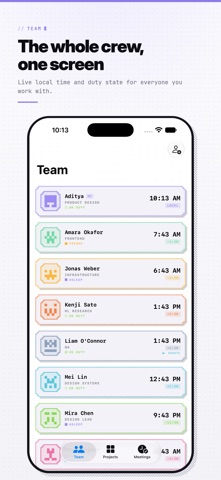
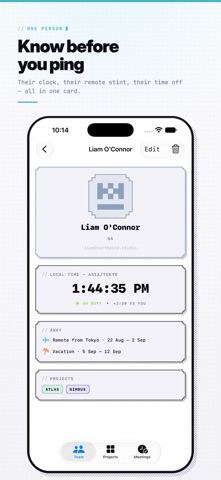
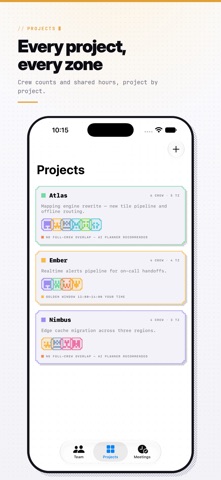
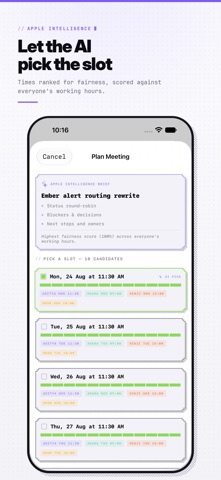
Dayshift shows you what time it actually is for everyone on your team, then finds the meeting time that's fair to all of them. Every teammate gets a live local clock and a duty state — ON DUTY, FRINGE, ASLEEP, or VACATION — so you know before you ping whether it's a good time or a 3am wake-up. Each project shows a shared-hours map for the day: the golden window where the whole crew's waking hours actually overlap. When it's time to meet, the planner scores candidate times for fairness across everyone's clock — not just whatever's convenient for the organizer — and writes the confirmed slot straight to your calendar. On supported devices, an on-device Apple Intelligence brief drafts a title and a three-point agenda for the meeting; without it, Dayshift falls back to a clear, deterministic agenda automatically, so planning never stalls waiting on a model. WHAT'S INSIDE • Team roster with live local clocks and duty states for every member • Per-project shared-hours map with the golden window highlighted • Fairness-scored meeting planner across time zones, vacations, and remote stints • One-tap save of the confirmed time to your calendar • Teammate portraits from your photo library, or generated with Image Playground • Team Clock widget for the Home Screen, in three sizes • Mac menu bar roster • Siri Shortcuts and five App Intents — get a teammate's local time, open a member or project, plan a meeting, add a teammate • Spotlight search for every team member BUILT FOR EVERY APPLE DEVICE One app, every platform: iPhone, iPad, Mac, and Apple Vision Pro. Your roster and projects sync privately across your devices with iCloud. PRIVATE BY DESIGN Dayshift makes no network calls of its own. No account, no server, no ad tracking. Your team's data lives in your own private iCloud — Dayshift never sees it. Built in the CRT-terminal pixel style — a Dayshift that looks like nothing else on your Home Screen.
Audience growth
Ratings growth
Baseline captured. Growth appears after the crawler observes a changed rating count.
Momentum comes from crawler snapshots for the tracked storefront. “Viral growth signal” means unusually fast recent rating gains; it is an indicator, not download data.
Price tracking
Price intelligence
First snapshot captured. The trend line starts after the next crawler price observation.
- First observed Sep 18, 2026 · 7:50 PM Free
Screenshots