About this app
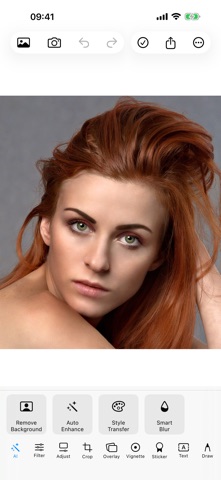
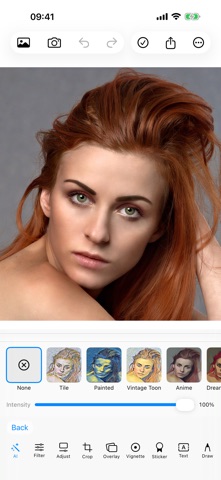
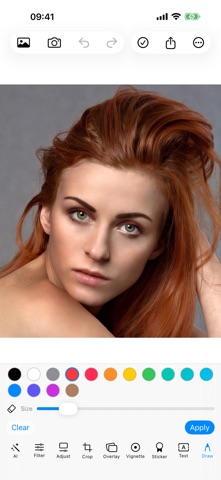
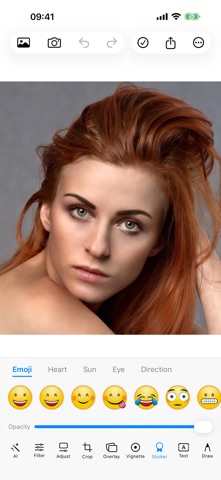
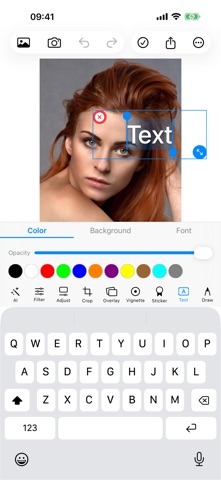
ShotText is a photo editor that does everything on your iPhone. No accounts. No cloud uploads. No analytics. Your photos never leave your device. EVERYTHING IS ON-DEVICE Every filter, every AI feature, every export happens locally using Apple's Core Image, Vision, and Core ML frameworks. Edit in airplane mode if you want — it all just works. AI THAT RUNS OFFLINE • Background removal — one tap to isolate a person and drop in a new background • Auto-enhance — smart correction for exposure, color, and sharpness • Style transfer — turn any photo into Mosaic, Starry Night, Cuphead, Anime, Cartoon, or White Box style with adjustable intensity • Object erase — paint over what you want gone 38+ FILTERS IN 9 CATEGORIES Film looks (Noir, Chrome, Fade, Instant), 11 cinematic LUTs, art styles, lighting effects (Bloom, Gloom, Thermal, X-Ray), pencil sketch, tone mapping, and more — with a global intensity slider on every one. EVERYTHING ELSE YOU EXPECT • Crop with aspect ratio presets, rotation, and flip • Adjustments for brightness, contrast, saturation, warmth, and sharpness • 73 stickers across 5 packs (emoji, hearts, suns, eyes, directions) • Editable text with font, color, background, and shadow controls • 8 overlay packs (grunge, colors, nature, patterns, wood, bubbles) • 6 vignette presets with start/end controls • PencilKit drawing with pressure-sensitive brushes and eraser EXPORT YOUR WAY HEIC, JPEG, or PNG with adjustable quality. One-tap export to a 9:16 Story format with a blurred background — perfect for Instagram, TikTok, or anywhere vertical. Saved photos go to your library and a dedicated "ShotText" album. DESIGNED FOR THE LONG SESSION • 20-level undo and redo • Long-press the canvas to compare before and after • Pick up exactly where you left off — sessions persist across app restarts • Optimized for iPad with a side-by-side editing layout • Haptic feedback on every action PRIVACY ShotText collects nothing. There are no servers, no accounts, no third-party SDKs. Read the full policy at turkdogan.dev/shottext/privacy.
Latest release
What’s New
ShotText 2.0 — a complete rebuild from the ground up. • Brand-new SwiftUI editor designed for iOS 17+ • 7 Core ML style transfer models (Mosaic, Starry Night, Cuphead, Anime Hayao, Anime Paprika, Cartoon, White Box) • AI background removal and AI auto-enhance, all on-device • Object erase with mask painting • 38+ filters across 9 categories, 11 LUTs, with a global intensity slider • 73 stickers, 8 overlay packs, 6 vignette presets • Crop, adjust, draw (PencilKit), and editable text • HEIC / JPEG / PNG export plus a 9:16 Story format with blurred background • 20-level undo and redo • Long-press the canvas to see before and after • Session persistence — pick up where you left off • iPad side-by-side layout • Haptic feedback throughout • Photos saved to a dedicated "ShotText" album • Zero tracking, zero analytics, zero accounts
Audience growth
Ratings growth
Baseline captured. Growth appears after the crawler observes a changed rating count.
Momentum comes from crawler snapshots for the tracked storefront. “Viral growth signal” means unusually fast recent rating gains; it is an indicator, not download data.
Price tracking
Price intelligence
First snapshot captured. The trend line starts after the next crawler price observation.
- First observed Sep 7, 2026 · 11:29 AM Free
Screenshots