About this app
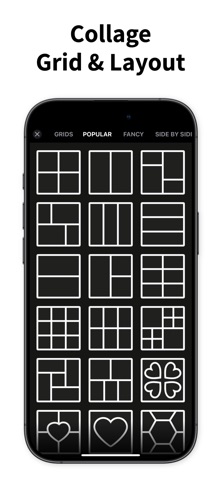
Other apps make collages. Mixgram makes them MOVE. Turn your photos and videos into scroll-stopping animated collages, edit on a real video timeline, add trending effects, and export in 4K — one app, trusted by 50 million creators for over a decade. Make it once, share it everywhere: TikTok, Instagram, Reels, Stories, WhatsApp. MIXGRAM AT A GLANCE • Photo & video collages with hundreds of grids, layouts & templates • Animated collage templates — drop in photos, get a share-ready video • Full video editor: timeline, music, trims, speed & 4K export • 40 viral effects: Glitch, VHS, Neon, Shake, Rain, Lightning & more • Stitch Studio for scrolling videos & extra-long photos • Sticker maker, cutouts, filters, fonts, backgrounds & doodles ANIMATED COLLAGES Professionally animated templates that bring your photos to life. Pick a template, drop in your photos, and get a scroll-stopping video in seconds — cinematic entrances, beat-driven layouts, and looping motion designed for the feed. Perfect for recaps, birthdays, photo dumps, and everything worth celebrating. ONE-TAP ANIMATIONS 14 cinematic presets — Pop, Wiggle, Ken Burns, Spotlight, Photo Dump and more. Animate your whole project at once, or give every photo, sticker, and text its own motion. Preview any animation instantly on your own content. A REAL VIDEO EDITOR INSIDE Trim clips, add music, control speed and volume, and fine-tune every element on a silky-smooth timeline. Then export in stunning quality up to 4K, powered by a high-performance rendering engine. VIRAL VIDEO EFFECTS 40 trending effects, one tap to apply: Glitch, VHS, Neon, Strobe, Light Leaks, Kaleido — plus Rain, Snow, Lightning and other atmosphere magic. Preview any effect on your own video instantly and dial in the intensity. STITCH STUDIO Think beyond a single post. Combine clips into seamless scrolling videos or stitch photos into extra-long panoramas — made for creators who want their feed to flow. YOUR STYLE, YOUR RULES • Hundreds of grids, layouts and a freestyle canvas — precise spacing, borders, and corners • Exclusive stickers plus a cutout Sticker Maker — export your packs straight to WhatsApp • Trendy fonts, curved text, filters, backgrounds, GIFs, and doodles • Memes, wallpapers, and photo widgets for your home screen NEVER LOSE A PROJECT Sign in and your projects back up to the cloud — pick up right where you left off (rolling out gradually). MIXGRAM PREMIUM Unlock everything: the full template collection updated regularly with trending designs, all animations and effects, the sticker maker, premium fonts and backgrounds — all watermark-free and ad-free. Try it free. LOVED BY 50 MILLION CREATORS For over a decade, Mixgram has helped people turn everyday moments into something worth sharing. Version 26 is our biggest leap yet — faster, smoother, and more powerful than ever. Download Mixgram and make something that stops the scroll. Terms of Use: https://www.mixgram.com/terms Privacy Policy: https://www.mixgram.com/privacy We can't wait to see what you create.
Latest release
What’s New
Mixgram 26 is our biggest update ever — the whole app has been rebuilt from the ground up. ■ ANIMATED COLLAGES — An all-new collection of professionally animated templates. Drop in your photos and get a scroll-stopping video in seconds, ready to share. ■ ONE-TAP ANIMATIONS — A brand-new animation engine with 14 cinematic presets: Pop, Wiggle, Ken Burns, Spotlight, Photo Dump and more. Animate the whole project — or give every photo, sticker, and text its own motion. Try any animation free and watch it play instantly. ■ VIDEO TIMELINE EDITOR — Trim clips, add music, layer effects, and fine-tune every element on the new timeline, with a silky-smooth live preview. ■ VIRAL VIDEO EFFECTS — 40 trending effects, one tap to apply: Glitch, VHS, Neon, Shake, Strobe, Light Leaks, Kaleido and more — plus Rain, Snow, Lightning and other atmosphere magic. Preview any effect on your own video instantly, adjust the intensity, and ride the trend. ■ 4K EXPORT — A new high-performance rendering engine. Your collages and videos now export in stunning quality, all the way up to 4K. ■ STITCH STUDIO — New: combine clips into scrolling videos or extra-long photos — made for TikTok, Instagram, and Stories. ■ CLOUD BACKUP — Sign in to keep your projects safe and pick up where you left off (rolling out gradually). ■ FASTER EVERYTHING — A redesigned, smoother editor with instant launch, fluid gestures, and reliable undo for every change. Plus a refreshed Home with trending templates and quick tools, new content dropping regularly, and dozens of fixes and refinements. Love the new Mixgram? Leave us a review — it means the world to us!
Audience growth
Ratings growth
Momentum comes from crawler snapshots for the tracked storefront. “Viral growth signal” means unusually fast recent rating gains; it is an indicator, not download data.
Price tracking
Price intelligence
- First observed Aug 15, 2026 · 2:34 AM Free
Screenshots