About this app
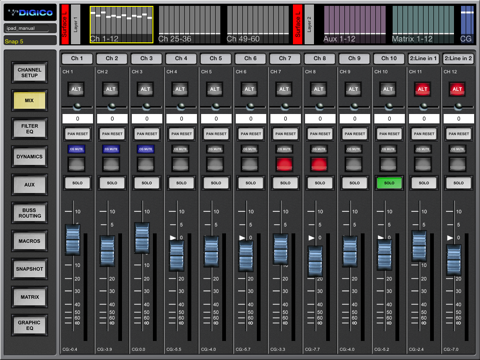
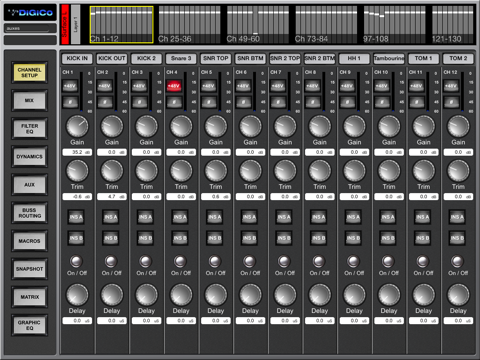
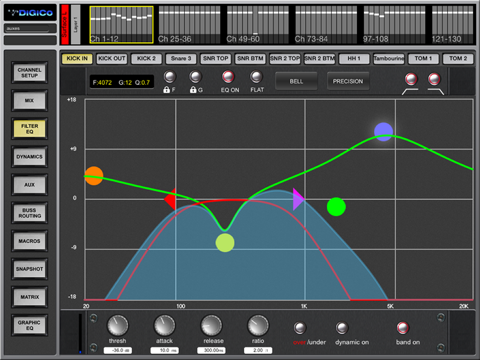
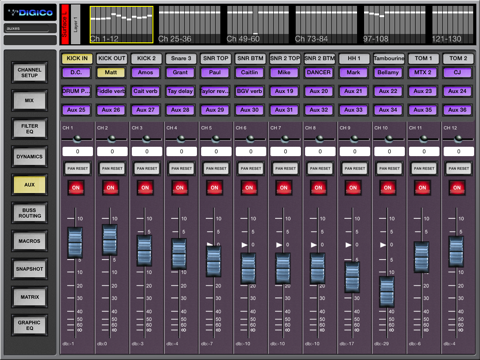
Set yourself free with the DiGiCo SD app. The DiGiCo SD app is the perfect way to control your DiGiCo SD console straight from your Apple iPad. It allows remote, wireless control of any DiGiCo SD mixing console, from the compact SD11 right up to the flagship SD7, wherever you are. The DiGiCo SD app permanently displays an overview of the console layout, so you can select any available console bank and have the same user-friendly operation you’re already familiar with, but without being tied to your console. The DiGiCo SD App requires V685+ of SD console software and External Control must be activated on the console. It is not compatible with with SD console software V634. Please contact your local DiGiCo distributor for more information on V685 External Control Activators The Activators will be available from Tuesday 4th November 2014 Note that Offline Demo Mode has been removed for iOS8 What you can control: Channel Setup - +48V, polarity, analogue gain, digital trim, channel delay, insert points on/off, meters Mix – channel label, Main/Alt input, pan, mute, solo, fader level, channel presets, meters EQ – 4 band EQ, HPF/LPF (8 Band EQ on relevant console models), Dynamic EQ parameters, presets Dynamics – all dynamics parameters for all console dynamics modes, presets Auxes – auxiliary send levels, on/off, auxiliary pans Buss Routing – assignment of channels to busses Macros – access to any Macro function that has been created on the console Snapshots – insert new, recall, update, delete, notes Matrix – sends, on/off, matrix input labels, presets Graphic EQ – 32 faders and on/off for each unit, flatten all bands Save Session
Latest release
What’s New
This update from Apple will improve the functionality of this app. No new features are included.
Audience growth
Ratings growth
Baseline captured. Growth appears after the crawler observes a changed rating count.
Momentum comes from crawler snapshots for the tracked storefront. “Viral growth signal” means unusually fast recent rating gains; it is an indicator, not download data.
Price tracking
Price intelligence
First snapshot captured. The trend line starts after the next crawler price observation.
- First observed Aug 26, 2026 · 7:06 AM Free
Screenshots