About this app
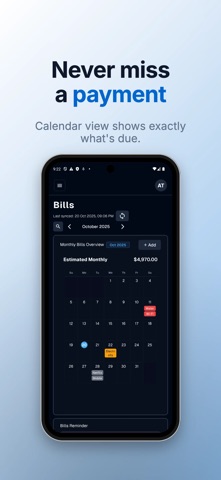
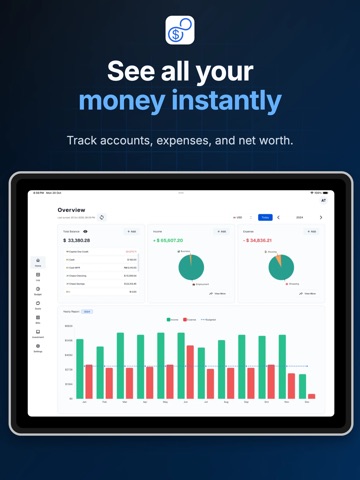
Take control of your money with 8udget — the smart budget tracker that works 100% offline. SMART EXPENSE TRACKING • Log expenses in seconds with categories, notes, and tags • AI-powered receipt scanner — snap a photo, done • Import bank statements (CSV) with 80-90% accuracy • Multi-currency support with automatic conversion BUDGET PLANNING • Set weekly, monthly, or yearly budgets • Get alerts before you overspend • Track multiple wallets — cash, cards, and accounts • Category-wise breakdown of where your money goes INVESTMENT & NET WORTH • Track stocks and crypto with real-time data • Monitor your complete net worth — assets and liabilities • Multi-currency portfolio support FINANCIAL GOALS & BILLS • Set savings goals and track progress visually • Bill reminders so you never miss a payment • Recurring expense management PRIVACY FIRST • Works 100% offline — no internet required • Bank-level AES encryption on your device • Your data stays on your device. Cloud sync is optional. • No ads. No data selling. Ever. ANALYTICS & INSIGHTS • Interactive spending charts and graphs • Monthly reports and trend analysis • Export to CSV/Excel anytime Available on iPhone, iPad, Mac. Free forever with 100 transactions/month. Upgrade to Premium for unlimited transactions, cloud sync, AI features, and investment tracking. Terms of Use: https://www.apple.com/legal/internet-services/itunes/dev/stdeula/
Latest release
What’s New
Subscriptions & billing • Turning off auto-renew no longer removes your access — you keep everything until the end of the period you already paid for • A failed payment no longer cuts you off mid-retry; access continues while your card is retried • After subscribing, the app waits for the purchase to activate instead of sending you back to the paywall • Restore Purchases now refreshes your account properly, and tells you when there is nothing to restore • Subscribing on the web no longer ends on a "page not found" screen • Your plan name and renewal date are shown correctly, and all subscription dates now use your own time zone instead of UTC • "Re-check" fetches live status instead of a cached answer, and no longer reloads the whole settings page • Deleting your account works again Faster transaction entry • Amount now leads the Add, Edit and Copy forms — it's the first thing you type • Switching transaction type no longer wipes the amount you already entered • Comma decimals ("12,50") are accepted in Add, Edit and Copy • Formula mode gets the operator keys on the keyboard • Forms open neutral instead of showing errors before you've touched anything Receipts • Choose where a receipt comes from: Photo Library or Files • Fixed an error when attaching the last receipt allowed for a transaction • Clearer count when adding several files at once Redesigned screens • Wallets are grouped into Cash & accounts, Credit & loans, and Investments & assets, as compact rows instead of a card grid • Bills: taller calendar days that show bill names instead of colour codes, and a cleaner divided bill list where paid bills recede • Bills that have fallen behind can be caught up or skipped in one step • Budget: a single usage meter replaces the three-bar chart, with a clearer verdict line • Portfolio: holdings drop the repeated currency code, and the whole row is tappable • Transaction rows, amounts and date separators now share one layout across every list Accessibility & polish • Input fields now meet the 3:1 contrast minimum in both light and dark themes • Larger tap targets throughout on iPhone • Amounts use tabular figures so they line up down a column Fixes • Net worth range labels (1M / 3M / 6M / 1Y / ALL) showed raw text in the combined-currency view • Fixed a crash when the keyboard animated in over a dialog • Removed doubled notch and home-indicator padding inside nested lists • Transfers no longer pick up tags that couldn't be removed afterwards • Loan term is now validated in the mortgage calculator
Audience growth
Ratings growth
Baseline captured. Growth appears after the crawler observes a changed rating count.
Momentum comes from crawler snapshots for the tracked storefront. “Viral growth signal” means unusually fast recent rating gains; it is an indicator, not download data.
Price tracking
Price intelligence
First snapshot captured. The trend line starts after the next crawler price observation.
- First observed Aug 8, 2026 · 3:17 PM Free
Screenshots