About this app
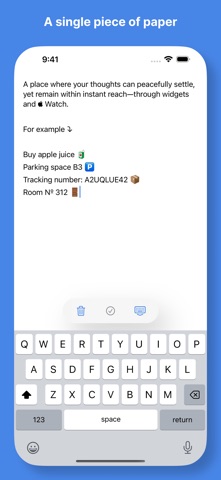
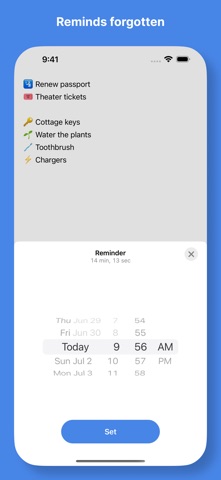
A single piece of paper for your peace of mind. That's exactly what Quick Notes is all about – a nifty place to jot down your thoughts as quickly as possible so you can let them go and decide what to do with them later. No lists, no excessive clutter – just open and take notes. Practicality and simplicity is deeply rooted in Quick Notes. Its meticulously arranged main screen, along with Home Screen Widgets, Apple Watch Complications, and Notifications keep you up to date efficiently. In addition, you can use Headings and Check marks to make your notes clearer at a glance, add a new note directly on your Apple Watch, customize the Widgets, or take control over the Dark Mode – all this and more with just a one-time purchase we call Everything. Features: • Single sheet for your quick notes and drafts • iCloud synchronization • Home Screen Widgets • Apple Watch Complications • Reminder Additionally with Everything (a one-time in-app purchase): • Headings • Check marks • Swipe left to delete a line • Version history • Appearance under control • Adding and ticking notes on Apple Watch • Character counter • Widget customization The app is ideal for things like to-do lists, grocery lists, packing lists, room numbers, tracking codes, or to remember your parking space. ---- Privacy Policy: https://quicknotesapp.net/privacy-policy.html
Latest release
What’s New
Redesigned from the ground up – with more features and the same level of easiness. New for all: • Lock Screen widget • Apple Watch Complications • Ability to snooze a reminder • Ability to quickly exit Edit Mode by pulling the keyboard down • Ability to display a single paragraph on a widget • Support section with tips and tricks • Enhanced App Icon • Czech localization New for those who enjoy Everything: • Headings • Check marks (also on Apple Watch) • Swipe left to delete a line • Character counter • Widget customization • Search in history This small patch resolves an issue with restoring in‑app purchases. As ever, Martin & Michal
Audience growth
Ratings growth
Baseline captured. Growth appears after the crawler observes a changed rating count.
Momentum comes from crawler snapshots for the tracked storefront. “Viral growth signal” means unusually fast recent rating gains; it is an indicator, not download data.
Price tracking
Price intelligence
- First observed Aug 12, 2026 · 10:49 PM Free
Screenshots