About this app
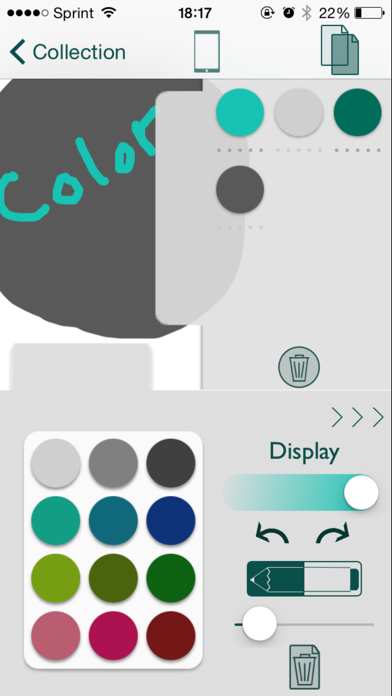
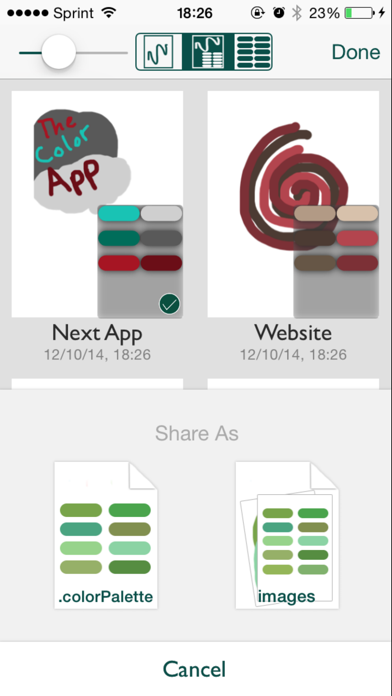
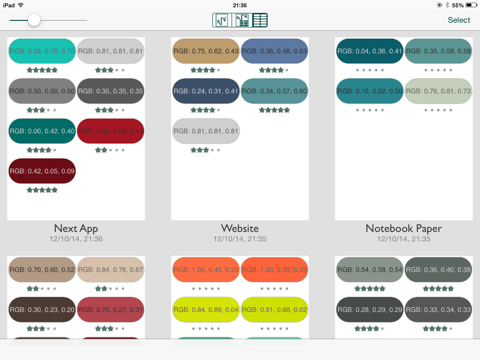
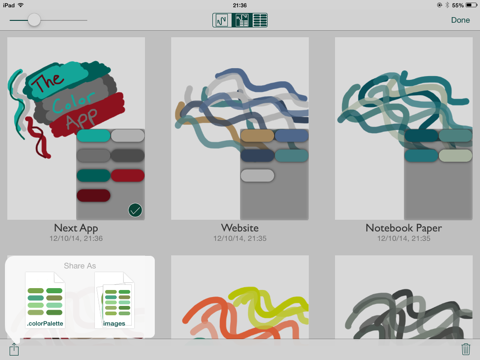
Create and name workspaces for finding color combinations that will look great in your next project. As you draw with colors chosen from a variety of available color pickers, the colors are added to a color palette. Zooming and panning are available in the drawing area to make drawing fine details easier. There are various color pickers for selecting and discovering colors, but one main display which shows a global color type of your choosing. Whichever color picker used, the main display will always show the current color's value in the desired system. There are eight main display types for viewing a color's value: HSB Integer, HSB Decimal, RGB Integer, RGB Decimal, RGB Percent, Named HTML, Three-Digit Hex, and Six-Digit Hex. There are six pickers available for selecting colors. First is an HSB (hue, saturation, brightness) picker with three sliders. Then there is an RGB (red, green, blue) picker also with three sliders. The third picker is Named HTML. It uses RGB sliders to display only the colors that have names in HTML/CSS. The fourth picker is Three-Digit Hex. It uses RGB sliders to display only colors that can be represented in three-digit hexadecimal form. The fifth picker is a gradient that can be touched for color selection. The sixth picker allows the user to bring an image into the app so that a color can be selected specifically from the image. Alpha can be adjusted for drawing. Once colors are drawn with, they appear in a side tab. When one of these colors is double-clicked, the color's triads, complementaries, analogous, and split complementaries can be viewed and added to the workspace color set. Also, a set of fixed-brightness, fixed-saturation, pseudo-random-hue colors are generated from this original color, and can be regenerated, as optional colors to add to your workspace. These workspace colors can be used to replace any of the 12 colors in the fixed color palette in order to allow for a set of personalized colors that can be accessed in any project. The Duplicate button will make a copy of the current workspace. This enables easy experimentation with colors. Sharing options include: sharing the drawings and/or sets of colors as images, or sending the set of colors as a Color App file to another user of The Color App. The first of these is useful for sharing, or saving to Photos, a color palette that has been designed or a picture drawn with the selected colors. The second sharing option is perfect for collaborating with others on a project involving choosing and viewing colors and their values. This app is useful for individuals who design on a computer and need to find color combinations and see each color’s values. It allows the user to pick perfect color palettes, then easily view the colors together, along with each color’s value in a chosen system. This allows for easy input into the computer for iOS development, web design, graphic design, and more. The app can also be used simply for drawing, with access to a rich set of ways to select colors with which to draw. Beautifully designed and easy to use, let The Color App become your favorite app for the professional or entertaining use of COLORS. NOTE: THE LITE VERSION OF THE COLOR APP WILL NOT SAVE ANY DATA. YOUR COLOR PALETTES AND WORKSPACES WILL ONLY BE AVAILABLE DURING THE SESSION YOU ARE USING THE APP. The full version, however, will save all user data.
Latest release
What’s New
This update from Apple will improve the functionality of this app. No new features are included.
Audience growth
Ratings growth
Baseline captured. Growth appears after the crawler observes a changed rating count.
Momentum comes from crawler snapshots for the tracked storefront. “Viral growth signal” means unusually fast recent rating gains; it is an indicator, not download data.
Price tracking
Price intelligence
First snapshot captured. The trend line starts after the next crawler price observation.
- First observed Aug 14, 2026 · 3:34 AM Free
Screenshots