About this app
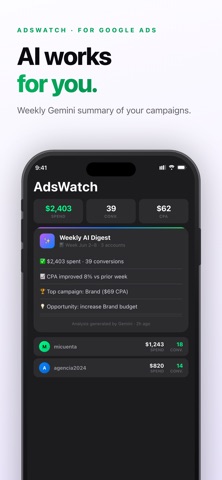
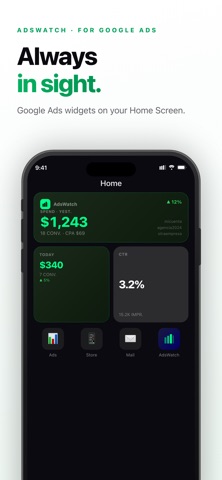
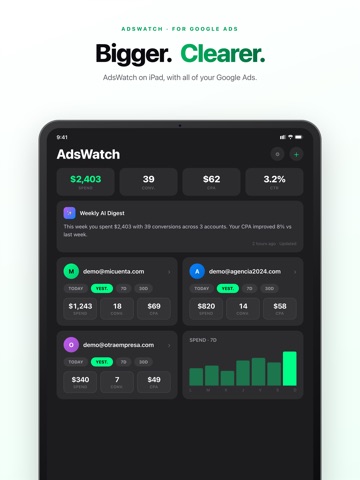
AdsWatch brings the performance of your Google Ads campaigns directly to wherever you are: your iPhone, Home Screen, Lock Screen, and Dynamic Island. Stop opening your browser or computer just to check if your strategies are working. With AdsWatch, you can see spend, conversions, CPA, CTR, and clicks in real time, comfortably from your wrist. AI-POWERED ANALYSIS (GEMINI 2.5 FLASH) Boost your strategy! Receive smart text summaries generated by AI and automatic anomaly detection in your ads. Apply official Google recommendations directly from your dashboard quickly and easily. WHAT YOU CAN DO WITH ADSWATCH: • MULTI-ACCOUNT DASHBOARD (MCC SUPPORT) Connect one or multiple Google Ads manager accounts. Each account shows spend, conversions, CPA, CTR, and clicks with a % trend indicator compared to the previous period. Switch between Today, Yesterday, 7 days, or 30 days with a single tap. • INTERACTIVE PERFORMANCE CHARTS Tap any account to analyze detailed charts of investment, conversions, and clicks. Break down data by individual campaigns, ad groups, devices, and real search terms. Filter by status or sort by CTR instantly. • APPLE WATCH COMPANION APP A complete metrics dashboard on your wrist! Monitor total spend, conversions, and CPA of your Google Ads campaigns. Pause or activate ads directly from the watch without taking your iPhone out of your pocket. • DYNAMIC ISLAND & LIVE ACTIVITIES AdsWatch works in the background, visible in the Island. Your current investment and trend will always be at the top of the screen, even while using other apps. • ADVANCED WIDGETS (HOME & LOCK SCREEN) Add AdsWatch widgets in small, medium, or large sizes. The large widget displays multiple accounts at once with their spend, conversions, and update time. Lock Screen widgets let you see key metrics without unlocking your phone. • CUSTOM SCHEDULED ALERTS Set up automated notifications per account: daily, weekly, or monthly. Each alert includes real data on spend, conversions, and CPA so you always know how your Google ad results are performing. PRIVACY FIRST AdsWatch connects to Google Ads securely using OAuth 2.0. Your advertising data travels directly from Google to your device locally. We do not store any of your information on external servers. REQUIREMENTS • An active Google Ads account is required. • iPhone with iOS 16.1 or later. • watchOS 10 or later is required for Apple Watch features. • Dynamic Island requires iPhone 14 Pro or later. AdsWatch is an independent application and is not affiliated with, endorsed, or sponsored by Google LLC. Terms of use: https://www.apple.com/legal/internet-services/itunes/dev/stdeula/
Latest release
What’s New
The biggest AdsWatch update yet: • CPC and ROAS on cards, widgets, Apple Watch and Dynamic Island • Account health: optimization score and impression share • Edit ads, bids, budgets, target CPA and ROAS without leaving the app • Ad scheduling and targeting: locations, languages and extensions • Change history and configured conversions • Budget alerts and comparison vs the previous period • Interactive widget with a refresh button (iOS 17) • Fully localized in 5 languages Thanks for your feedback. We keep improving AdsWatch!
Audience growth
Ratings growth
Baseline captured. Growth appears after the crawler observes a changed rating count.
Momentum comes from crawler snapshots for the tracked storefront. “Viral growth signal” means unusually fast recent rating gains; it is an indicator, not download data.
Price tracking
Price intelligence
First snapshot captured. The trend line starts after the next crawler price observation.
- First observed Aug 23, 2026 · 2:42 AM Free
Screenshots