About this app
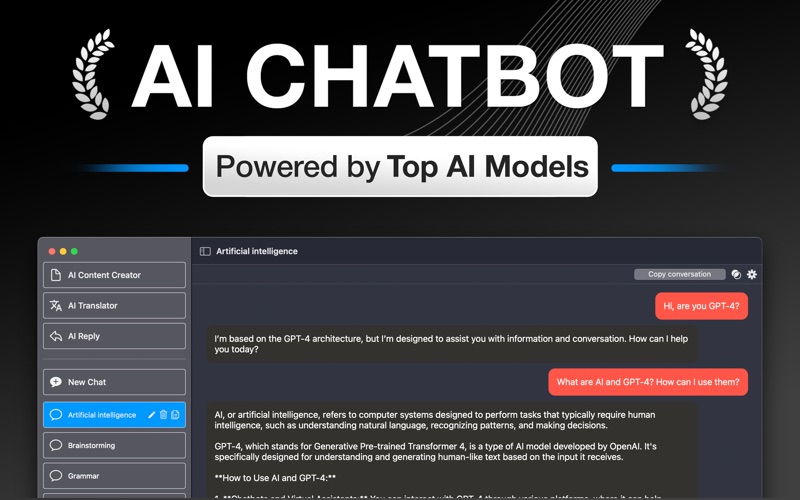
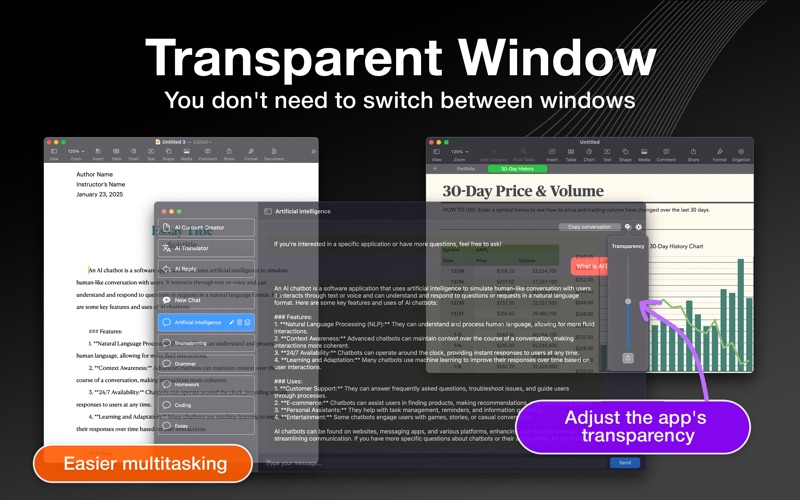
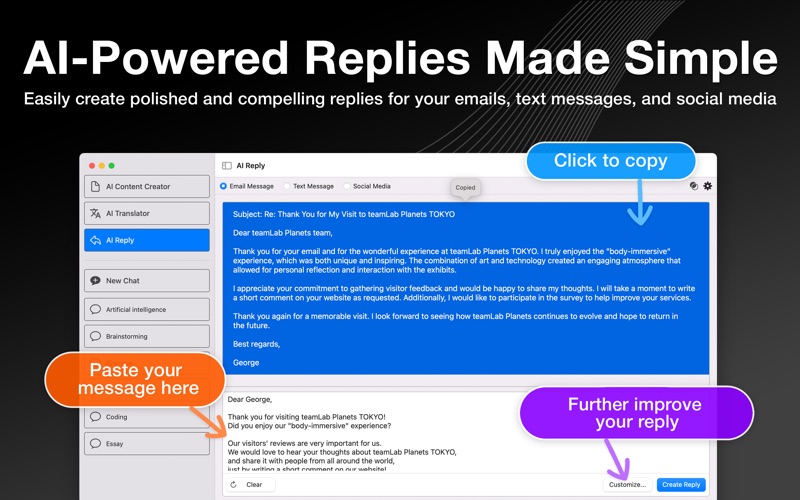
AI Chatbot – Your Intelligent AI Chat Companion! Unlock the power of AI on your Mac with "AI Chatbot", the ultimate chat assistant designed to simplify your life, boost your productivity, and answer your every question. Whether you need help brainstorming ideas, writing content, solving problems, or simply having a friendly chat, "AI Chatbot" is here to assist you. This app is designed to make interacting with AI on macOS as seamless and convenient as possible. With a focus on ease of use and deep macOS integration, you can effortlessly access AI Chatbot alongside other applications. **Key Features** AI-Powered Chat, Anytime Engage with a powerful AI that answers questions, offers recommendations, and provides insights on any topic. From writing emails and essays to brainstorming ideas, let AI make creativity and productivity effortless. AI Content Creator Effortlessly create professional content and documents like social media posts, press releases, formal invoices, and more. AI Reply Generate professional, polite, and engaging replies for emails, text messages, and social media interactions, with options to refine them until satisfied. AI Translator Provide accurate and context-aware translations across multiple languages, excelling at translating both formal text and colloquial or casual speech. Perfect for work, travel, or learning. QuickAccess Feature Quickly access AI from anywhere on your Mac. Simply type a keyboard shortcut to activate the lightweight text field that appears in the center of your screen and start chatting instantly—no need to switch apps. Menu Bar Access Launch AI Chatbot directly from your menu bar for instant conversations, reducing friction and improving efficiency during busy workdays. Easy Copying Copy a clean, readable transcript of your conversations or any responses from AI for easy sharing and record-keeping. Transparent Window Adjust the app's transparency to overlay the chat window on other applications, eliminating the need to switch between windows. This makes multitasking easier and helps you maintain focus on complex workflows. Global Prompt Customize responses globally by setting a prompt that applies to all AI inquiries—for example, limiting answers to 50 words for concise responses. User Preferences Tailor your experience by selecting the GPT model, temperature, and response mode (Normal or Deep Dive). Additional options include “Always on Top,” “Launch at System Startup,” and more. Seamless Mac Integration This app is designed exclusively for macOS, offering a smooth and intuitive interface optimized for desktop use. Enjoy a sleek design with support for both Light and Dark Mode, perfectly tailored to match your system preferences. --- **Why Choose Us?** Designed for Mac users who demand versatility, "AI Chatbot" combines cutting-edge AI capabilities with a thoughtful user interface. Whether you’re writing emails, managing tasks, translating languages, or simply exploring ideas, "AI Chatbot" delivers unparalleled convenience and productivity. Disclaimer: This app is an independent application developed using the official API. It is not affiliated with or endorsed by OpenAI or any other AI technology providers. Privacy Policy: https://videoapp9.weebly.com/privacy-policy.html Terms of Use: https://videoapp9.weebly.com/terms.html
Latest release
What’s New
We have improved app performance in this version.
Audience growth
Ratings growth
Baseline captured. Growth appears after the crawler observes a changed rating count.
Momentum comes from crawler snapshots for the tracked storefront. “Viral growth signal” means unusually fast recent rating gains; it is an indicator, not download data.
Price tracking
Price intelligence
First snapshot captured. The trend line starts after the next crawler price observation.
- First observed Aug 8, 2026 · 1:10 PM Free
Screenshots