About this app
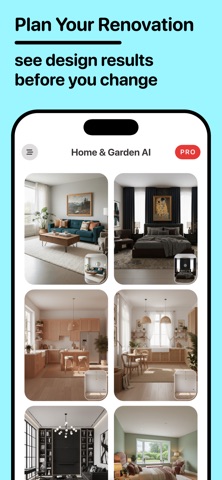
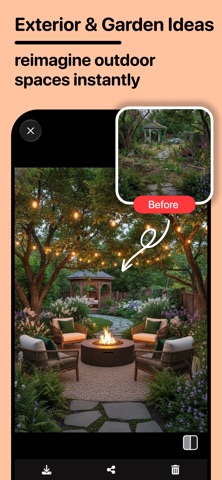
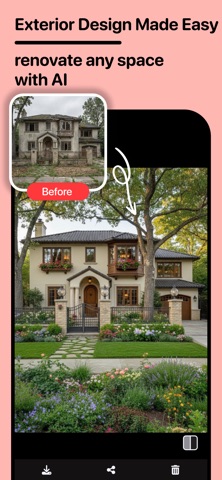
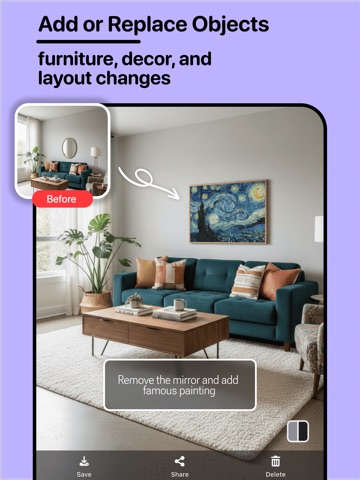
Redesign your home with AI. Home AI turns photos of rooms, exteriors, gardens, patios, and empty spaces into fresh interior design ideas, remodel concepts, decor inspiration, and virtual staging visuals. Planning a room makeover? Thinking about a renovation? Wondering how your bedroom, living room, kitchen, bathroom, garden, or house exterior could look in a different style? Upload a photo, choose a design direction, and generate new visual ideas before you buy furniture, choose paint, or start a remodel. Home AI is made for homeowners, renters, DIY decorators, real estate agents, interior design creators, and anyone who wants to visualize a space before making decisions. AI HOME DESIGN FROM YOUR PHOTOS Start with a real photo of your space and explore new looks for: - Living room design - Bedroom design - Kitchen design - Bathroom design - Office design ideas - Empty room furnishing - Home exterior redesign - Facade and curb appeal ideas - Garden, backyard, patio, and landscape ideas Instead of guessing how a room might look, generate visual concepts and compare different ideas quickly. ROOM PLANNER & INTERIOR DESIGN IDEAS Use Home AI as an AI room planner and interior design visualizer. Try different styles, colors, layouts, furniture moods, and decor directions from the same room photo. Explore modern, minimalist, luxury, Scandinavian, farmhouse, rustic, industrial, Mediterranean, contemporary, cozy, and many other home decor styles. Whether you want a clean modern interior, a warmer bedroom, a brighter kitchen, or a more stylish living room, Home AI helps you discover new directions. RENOVATION, REMODEL & REDESIGN INSPIRATION Before starting a renovation or remodel, it helps to see possibilities. Home AI can generate concept visuals for room makeovers, wall paint ideas, exterior remodels, garden updates, and home redesign projects. Use it to preview: - Room makeover ideas - Paint color inspiration - Furniture and decor concepts - Interior remodel directions - Exterior renovation ideas - Garden and backyard design styles - Empty room staging concepts Home AI does not replace professional construction, architecture, or technical planning. It gives you visual inspiration so you can clarify your taste and explore ideas more confidently. VIRTUAL STAGING FOR EMPTY ROOMS Have an empty room photo? Home AI can help you visualize furnishing and decor ideas for vacant spaces. Use virtual staging concepts for real estate listings, rental preparation, home staging inspiration, or imagining how an empty bedroom, living room, office, or apartment could look with furniture. EXTERIOR, GARDEN & OUTDOOR DESIGN Home AI is not only for interior rooms. Explore home exterior design, facade refresh ideas, garden inspiration, backyard concepts, patio styles, and landscape design directions. Try new looks for outdoor spaces and visualize ideas for curb appeal, garden decoration, or backyard planning. HOW IT WORKS 1. Upload a photo of your room, house exterior, garden, patio, or empty space 2. Choose the space type and design style 3. Generate AI home design ideas 4. Save your favorite results 5. Compare decor, remodel, and redesign concepts WHY USE HOME AI? - Get interior design ideas from real room photos - Visualize home decor before buying furniture - Explore room planner concepts without design experience - Try bedroom, kitchen, bathroom, and living room redesigns - Generate exterior remodel and garden inspiration - Create virtual staging ideas for empty rooms - Test styles before committing to one look - Save time when planning a renovation or home refresh Your home has more possibilities than one layout, one color, or one style. Home AI helps you explore those possibilities visually and creatively. Upload a photo and start designing your dream space with Home AI today. Privacy Policy: https://olympos-apps-5adc1.web.app/homeai/privacy.html Terms of Use: https://www.apple.com/legal/internet-services/itunes/dev/stdeula/
Latest release
What’s New
This update makes Home AI smoother for exploring room redesigns, exterior ideas, garden concepts, and virtual staging. We improved the overall design flow, refreshed the experience, and fixed issues to make AI home planning feel faster and more reliable.
Audience growth
Ratings growth
Baseline captured. Growth appears after the crawler observes a changed rating count.
Momentum comes from crawler snapshots for the tracked storefront. “Viral growth signal” means unusually fast recent rating gains; it is an indicator, not download data.
Price tracking
Price intelligence
First snapshot captured. The trend line starts after the next crawler price observation.
- First observed Aug 13, 2026 · 12:22 AM Free
Screenshots