About this app
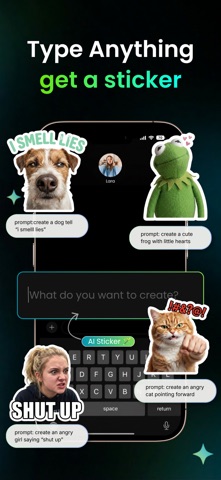
Create custom AI stickers instantly from text, photos, or both. Sticker AI lets you turn your ideas, selfies, pets, friends, and funny moments into unique stickers right from your keyboard. Type a prompt, upload a photo, or combine image + text to create stickers you can copy and paste into chats in seconds. Create Stickers in Seconds: Open Sticker AI directly from your keyboard and generate custom stickers without leaving your chat. It’s fast, simple, and built for everyday conversations. Text to Sticker: Just type what you want and let Sticker AI turn your idea into a custom sticker. From funny reactions to cute characters and creative prompts, your words become stickers in seconds. Image + Text Creation: Want more control? Upload a photo and add a prompt to transform it into something totally new. Turn yourself into a witch, a cowboy, a cartoon version, or anything else you can imagine. Turn Photos into Stickers: Use your own photos to create personalized stickers for chats, jokes, reactions, and special moments. Perfect for friends, couples, pets, memes, and everyday fun. Create Inside Your Keyboard: No need to switch between apps. Sticker AI works right inside your keyboard, so you can create and send stickers while chatting in your favorite apps. Premium Sticker Styles: Unlock exclusive premium styles and create even more eye-catching, unique stickers from your photos and prompts. Why You’ll Love Sticker AI: · Create stickers from text prompts · Turn photos into custom stickers · Use Image + Text for more personalized results · Generate stickers directly inside your keyboard · Make chats more fun with unique reactions · Enjoy premium sticker styles · Share your stickers easily in chats and messages Ready to make your conversations more fun? Download Sticker AI now and start creating your own stickers in seconds. EULA: https://apple.com/legal/internet-services/itunes/dev/stdeula Privacy Policy: https://www.fate.tech/privacypolicyterms
Latest release
What’s New
Bug fixes and performance improvements.
Audience growth
Ratings growth
Momentum comes from crawler snapshots for the tracked storefront. “Viral growth signal” means unusually fast recent rating gains; it is an indicator, not download data.
Price tracking
Price intelligence
- First observed Aug 20, 2026 · 12:20 AM Free
Screenshots