About this app
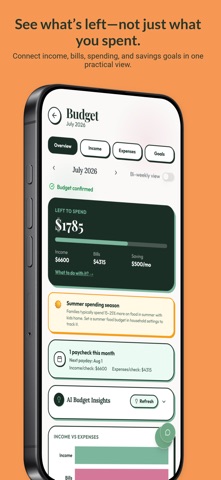
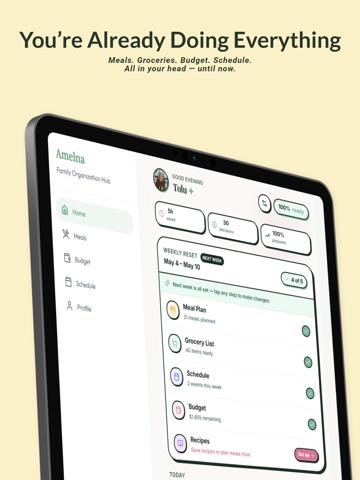
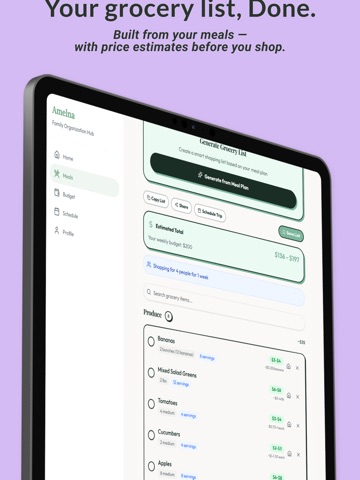
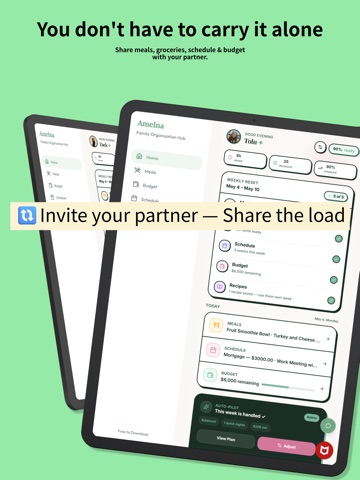
Plan your week. Share the load. Amelna is an AI-powered family organizer that connects meals, groceries, pantry items, household budgets, savings goals, and family schedules in one weekly system. WITH AMELNA, YOU CAN: • Create meal plans personalized to your family • Discover recipes based on your preferences and dietary needs • Plan meals around your energy and capacity for the week • Generate grocery lists with estimated costs • Cook with pantry staples and receive low-stock reminders • Track income, bills, spending and savings goals • See meals, events and upcoming bills on one calendar • Share the household plan through Amelna Share • Use Auto-Pilot to prepare future weeks • Ask Amelna for specific, household-aware recommendations 1. MEAL PLANNING BUILT AROUND REAL LIFE Create personalized meal plans and recipes based on your family size, cuisine preferences, dietary needs, grocery budget, and pantry staples. Choose how much energy you have for the week—Surviving, Balanced or Thriving—and Amelna builds a plan that works with your actual capacity. Already have food at home? Amelna can include pantry staples in your meal plans, identify ingredients you already have, and remind you when pantry items are running low. When you want planning to happen automatically, Auto-Pilot can prepare upcoming weeks based on your preferred schedule. 2. TURN YOUR MEAL PLAN INTO A GROCERY PLAN Generate an organized grocery list directly from your meal plan and see an estimated cost range before you shop. Compare the estimate with your weekly grocery budget, find opportunities to make more budget-friendly choices, and check off groceries together in real time. 3. SEE THE FULL FINANCIAL PICTURE Track household income, recurring bills, expenses, grocery spending and savings goals in one place. Amelna provides personalized budget and savings insights to help you understand where your money is going, what has changed, and what could help you stay on track. 4. A CALENDAR CONNECTED TO THE REST OF YOUR HOUSEHOLD Your calendar shouldn’t exist separately from the rest of your planning. See family events, planned meals, upcoming bills, and budget entries together for a clearer picture of the week ahead. Connect Google Calendar to bring existing commitments into Amelna and plan meals around what is actually happening. 5. SHARE THE HOUSEHOLD PLAN With Premium, Amelna Share lets you invite your partner or another household member at no additional cost. Keep meals, groceries, budgets and schedules visible in one shared place. Add family events, check off groceries together, and make the household plan easier for everyone to see. 6. AMELNA NOTICES. YOU CAN ASK WHY. Amelna Noticed identifies patterns across your meals, groceries, pantry, spending, savings, and schedule. Ask Amelna why something is happening, what changed, or what to do next. Amelna connects information across your household to provide a specific explanation and one practical recommendation—not generic advice. 7. START WHERE YOU NEED SUPPORT Choose meal planning, grocery savings, household budgeting, family schedules, or guided exploration. Amelna personalizes your first experience around what matters most to you. EXPLORE PREMIUM FOR 72 HOURS New users automatically receive a 72-hour Premium Preview—no payment required. Explore personalized meal planning, Ask Amelna, household insights, Amelna Share, Auto-Pilot, and other Premium features. When the preview ends, continue with Amelna Free unless you choose to upgrade. Built for busy families, working parents, and couples who want their household planning connected—and fewer details living in one person’s head.
Latest release
What’s New
A better start. Smarter support every week. 1. New to Amelna? Choose what you want help with first—meal planning, grocery savings, household budgeting, family schedules, or guided exploration—and begin with a setup tailored to that goal. 2. You’ll also receive a 72-hour Premium Preview automatically, with no payment required. When it ends, continue with Amelna Free unless you choose to subscribe. 3. Already using Amelna? Amelna Noticed now surfaces cleaner, more useful insights. Ask Amelna connects your schedule, meals, groceries, and budget to explain what’s happening and recommend a practical next step using specific details from your household. 4. We also improved cuisine, dietary, budget, and pantry preferences; grocery pricing; Google Calendar sync; meal and grocery displays; and reliability throughout the app. Try it after updating: Open an insight and tap a question under Ask Amelna.
Audience growth
Ratings growth
Baseline captured. Growth appears after the crawler observes a changed rating count.
Momentum comes from crawler snapshots for the tracked storefront. “Viral growth signal” means unusually fast recent rating gains; it is an indicator, not download data.
Price tracking
Price intelligence
First snapshot captured. The trend line starts after the next crawler price observation.
- First observed Sep 2, 2026 · 5:09 AM Free
Screenshots