About this app
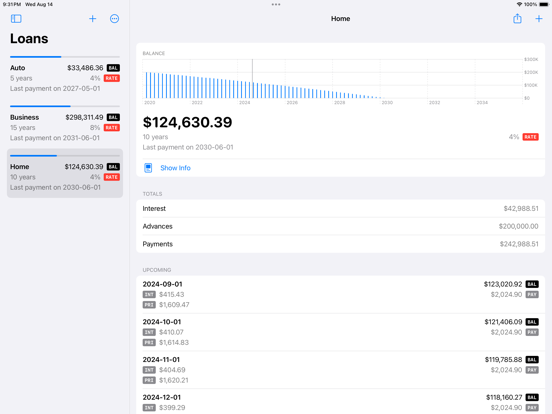
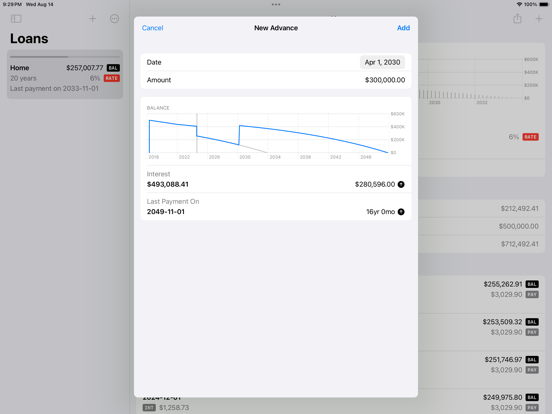
Amortization for iOS is designed to accommodate the changes that occur over the life of your mortgage. Enter rate increases and decreases and see how they impact your amortization schedule. Add prepayments and see how much you’ll save in both interest and time. Estimate your payments - Calculate suggested payments when creating your loan - Choose payment frequencies from weekly to annually - Adjust your payments or enter prepayments - Choose custom compounding periods when estimating payments Measure changes to your amortization schedule - Visualize your balance over your mortgage lifetime - Update your rate when your variable rate changes or when you renegotiate your mortgage - Change your payment amount or frequency - Enter prepayments as one-time or on various recurring schedules Share your loan info - Share loans between family members and between borrowers and lenders - Import loans that have been shared with you - Preview shared loans using Quick Look - Export your amortization schedule as an XLSX document Designed to feel at home on your iOS device - Inspired by the various first-party apps that ship with your phone - Supports both light and dark appearances Amortization is subscription-based, with the free download being limited to 3 loans and 5 recurring or one-time payments. Thanks for your interest in Amortization, and please don't hesitate to reach out through our support form with any questions, comments, or feature requests.
Latest release
What’s New
This version moves Amortization to a free download and an annual subscription. For those that purchased Amortization before version 1.3, Amortization behaves the same as the annual subscription (without the time limit of course). If you purchased Amortization before version 1.3 and see the Premium Access on the main screen, please contact me. Other updates: - Added welcome screens - Minor layout updates - Updated icons and added dark and tinted versions - Fixed issues with state where some loan updates were not shown without restart
Audience growth
Ratings growth
Baseline captured. Growth appears after the crawler observes a changed rating count.
Momentum comes from crawler snapshots for the tracked storefront. “Viral growth signal” means unusually fast recent rating gains; it is an indicator, not download data.
Price tracking
Price intelligence
First snapshot captured. The trend line starts after the next crawler price observation.
- First observed Aug 19, 2026 · 7:42 PM Free
Screenshots