About this app
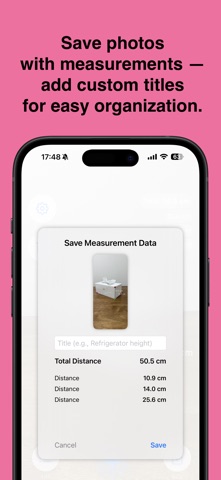
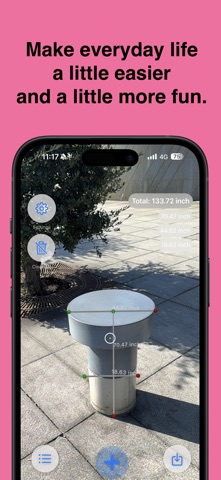
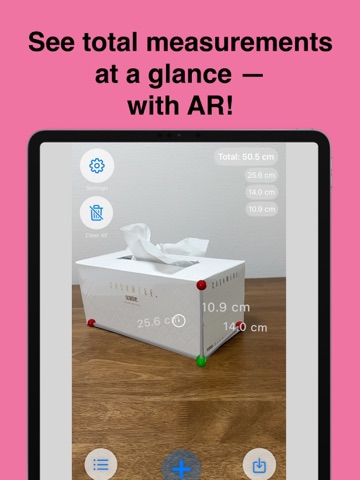
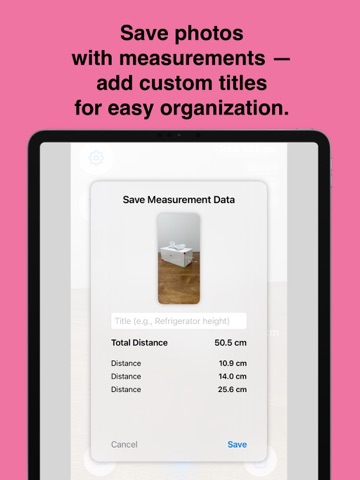
Measure real-world objects quickly and accurately using your iPhone’s camera and AR technology. Capture distances, save snapshots with measurements, add notes, and review past records — perfect for everyday tasks, DIY projects, furniture planning, package checking, and more. * Features • AR Distance Measurement — Point your camera and measure instantly in cm, mm, or inches. • Snapshot Saving — Save photos with all distances included, plus automatic total distance calculation. • Organized Notes — Add titles like “Bookshelf height” and keep your measurements neatly stored. • History View — Browse past measurements with images, totals, and individual values. • Works Offline — Measurement and history viewing work without an internet connection. * FAQ Is the app free? Yes. The app is free to download and use. A small banner ad is shown at the bottom, and you can remove ads with a one-time purchase. How do I save measurements? After taking a measurement, tap the save button to add a title and store it with a snapshot. Which units can I use? You can switch between millimeters, centimeters, and inches in the settings. Can I edit past records? Saved measurements can be viewed or deleted at any time from the history screen. Who is this app for? Anyone who needs quick, simple, and accurate measurements — including homeowners, DIY users, students, movers, and shoppers.
Audience growth
Ratings growth
Baseline captured. Growth appears after the crawler observes a changed rating count.
Momentum comes from crawler snapshots for the tracked storefront. “Viral growth signal” means unusually fast recent rating gains; it is an indicator, not download data.
Price tracking
Price intelligence
First snapshot captured. The trend line starts after the next crawler price observation.
- First observed Aug 21, 2026 · 11:16 AM Free
Screenshots