About this app
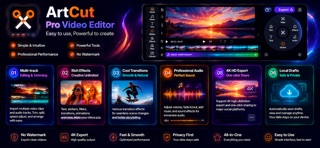
ArtCut is a local-first video editing app for everyday creators. Import multiple clips from Photos, arrange them on a timeline, trim, split, adjust speed, apply slow motion, reverse clips, and add transitions. You can also add borders, captions, stickers, doodles, mosaic areas, cover titles, and picture-in-picture frames. The app is built with SwiftUI and AVFoundation. Core editing work is handled on device where possible, and the main workflow does not require an account. Exported videos can be shared or saved to Photos. Drafts are stored locally so you can continue editing later. Key features: - Multi-clip import and timeline stitching - Trim, split, speed change, slow motion, and reverse rendering - Scale, rotate, flip, and border controls - Captions, stickers, cover titles, doodles, mosaics, and picture-in-picture - Cross-track transitions including dissolve, slide, and flash - Automatic captions using Apple's speech recognition framework - Volume, mute, fade in/out, and audio extraction - Local drafts, undo/redo, and cache cleanup - HD video export, sharing, and saving to Photos - No account required, with local drafts and manageable caches ArtCut is designed for daily clips, travel videos, class materials, social posts, and personal portfolios.
Latest release
What’s New
Added Smart Watermark Removal with automatic detection for common Douyin, Kuaishou, TikTok, and Kwai watermarks. Supports multiple removal areas, Smart Fill, Soft Blur, adjustable strength, dragging, and resizing. Improved on-video editing for captions, stickers, mosaic, doodles, and picture-in-picture layers, including moving, resizing, editing, and deleting. Picture-in-picture now supports importing a separate video or image. Fixed issues where video import, editor workspaces, preview, or export could become unresponsive or crash. Fixed unresponsive layer edit/delete controls and multi-watermark selection. Improved iOS 15.6 compatibility, iPad layouts, draft recovery, and missing-media handling.
Audience growth
Ratings growth
Baseline captured. Growth appears after the crawler observes a changed rating count.
Momentum comes from crawler snapshots for the tracked storefront. “Viral growth signal” means unusually fast recent rating gains; it is an indicator, not download data.
Price tracking
Price intelligence
First snapshot captured. The trend line starts after the next crawler price observation.
- First observed Aug 19, 2026 · 12:16 PM Free
Screenshots