About this app
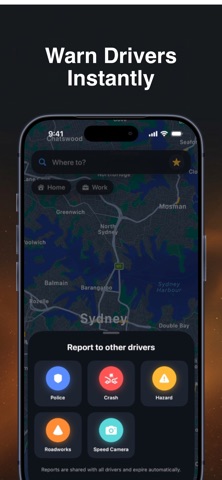
Australia Maps turns your iPhone into a smart co-driver. Search any place in Australia, get turn-by-turn voice navigation with an Aussie accent, and stay ahead of what's on the road — police, crashes, hazards, roadworks, and speed cameras reported live by other drivers. A glowing speedometer watches your speed against the real limit of the road you're on and warns you out loud if you're over. Features Turn-by-turn navigation — route options with ETA/distance, large turn banners, live-updating arrival bar Voice guidance — Australian English voice announces every turn twice (heads-up + at the turn), arrival, and hazards ahead Community reports — report police, crashes, hazards, roadworks, and speed cameras in two taps; shared live between all users, with "still there" confirmations and automatic expiry On-route alerts — banner, haptic buzz, and spoken warning as you approach a reported hazard or camera Live speed limits — the real limit of the road you're on, updated automatically as you drive between zones, with spoken "speed limit is now 80" callouts Over-limit warnings — speedometer turns red and the voice tells you to slow down Traffic lights on route — signal locations shown along your route in preview and driving mode Saved places — Home and Work shortcuts, favourites, and recent searches Screen stays awake — the display never sleeps mid-drive Premium dark design — near-black map, electric-blue route line, floating glass panels, haptics everywhere.
Audience growth
Ratings growth
Baseline captured. Growth appears after the crawler observes a changed rating count.
Momentum comes from crawler snapshots for the tracked storefront. “Viral growth signal” means unusually fast recent rating gains; it is an indicator, not download data.
Price tracking
Price intelligence
First snapshot captured. The trend line starts after the next crawler price observation.
- First observed Oct 12, 2026 · 10:00 AM Free
Screenshots