About this app
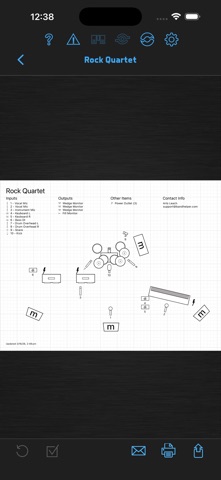
Much more than a "songbook" app, BandHelper can organize your band and power your live show. COMMUNICATE EFFORTLESSLY • Distribute songs and set lists automatically to your bandmates • Send standardized gig invitations and confirmations • Maintain one organized source for gig details • Give sub players all the charts and recordings they need for a gig REHEARSE EFFICIENTLY • Sync set list, lyric and chord updates as you work • Play reference recordings instantly, with speed and loop controls • Transpose chords for different singers, capo positions or horn keys • Review notes and voice memos from previous rehearsals PERFORM SEAMLESSLY • Configure keyboards, effects and lighting as you change songs • Play backing tracks, click tracks and video presentations • Customize the interface or use foot switches for hands-free control • Add custom fields for personal notes and reminders MANAGE YOUR BAND PROFESSIONALLY • Track income/expenses and let band members view their earnings • Organize your booking and industry contacts • Build stage plots to send to venues • Generate invoices to send to clients *** If you have a problem or a suggestion, please contact me before writing a review. I can't troubleshoot problems through the review system, but I respond promptly to all help tickets and posts in my support forum. ***
Latest release
What’s New
* Added support for LRC formatting: timestamps embedded into lyrics with square brackets. If you start the auto-scroll function for lyrics containing timestamps, BandHelper will jump to lines of lyrics at the specified times instead of smoothly scrolling through the entire lyrics. If you start the auto-scroll function while playing a recording, the LRC timestamps will sync to the recording time, even if you skip or jump around within the recording. • Added buttons to the automation track edit window to convert between Highlight Lyric Line automation events and LRC timestamps. You can use this if you previously set up lyric highlighting with an automation track but now want to use the new LRC functionality, or if you previously set up lyric highlighting with LRC timestamps but now want to use an automation track. • Updated the document import function to support LRC files (.lrc extension). If you import an LRC file, BandHelper will copy its lyrics, timestamps and supported metadata into a new song and then discard the file. • Updated the export buttons to offer more sharing options. Save to Files is still available, but you might have to scroll down or click More to see it. • Updated the Control Center integration to show the BandHelper icon and allow stepping through songs in a set list if the remote screen offers previous/next buttons. To control BandHelper from the Control Center, you will need to turn off Settings > Audio & MIDI > Play Audio Simultaneously With Other Apps. To step through songs, you will need to have the Start Recording app control action set to Song Selection or Song Auto-Selection. • Updated the audio functions so another app's audio will keep playing until you play audio from BandHelper when Settings > Audio & MIDI > Play Audio Simultaneously With Other Apps is off, and renamed that setting from Let Other Apps Play Audio In Background to better describe the new behavior. • Optimized the account syncing by only checking for missing files once at the end of the sync, and added a progress bar while checking for missing files. • Disabled the operating system's Smart Punctuation functionality in the Chords field to allow typing three dashes to create a column divider. • Restored the blink behavior of the automation button while recording.
Audience growth
Ratings growth
Momentum comes from crawler snapshots for the tracked storefront. “Viral growth signal” means unusually fast recent rating gains; it is an indicator, not download data.
Price tracking
Price intelligence
First snapshot captured. The trend line starts after the next crawler price observation.
- First observed Aug 21, 2026 · 9:20 PM Free
Screenshots