About this app
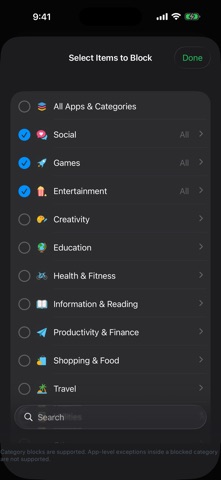
bar'd is the ultimate physical lock for your digital distractions. Built on Apple's strict Screen Time API, bar'd doesn't just ask you nicely to put your phone down—it forces you to. Link your custom Focus Modes (like Work, Study, or Phone-free Dinner) to a physical barcode anywhere in your house or office. Once you activate a session, your distracting apps are shielded. The only way back in? Get up, walk over, and scan that exact physical barcode. There is no PIN bypass. There is no cooldown timer. There is no "remind me in 15 minutes." You either delete the app, or you scan the barcode. HOW IT WORKS: Create a Mode: Set up a profile (e.g., "Dumb phone") and whitelist only the apps you actually need. Everything else gets shielded. Bind a Barcode: Link the mode to any physical barcode (a book, a coffee bag, a label on your desk). Lock In: Activate the mode manually or set an automated daily schedule. Unlock: To pause, edit, or stop the session early, you must physically scan the tied barcode. KEY FEATURES: • Unbreakable Focus: Uses Apple's FamilyControls to securely shield blocked apps at the system level. • Physical Accountability: Ties your digital habits to the physical world using your camera's AVFoundation pipeline. • Custom Schedules: Automate your focus times in the background. • Stats & Streaks: Track your focused hours, build a daily streak, and climb the ranks up to Grandmaster. • Private by Design: All App Group state and SwiftData persistence happens entirely on-device.
Latest release
What’s New
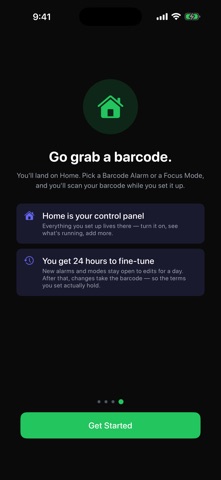
What's New bar'd is now built around one idea: your phone, on your terms. • Redesigned intro that explains the whole thing in seconds — pick a real barcode, put it somewhere you'll walk to, scan it when you mean it. • Barcode Alarm for the morning doom scroll: it keeps ringing until you're up and scanning, and you can now set how often it re-rings and for how long. • The ringing screen is clearer that the alarm is still on until you scan — silencing it doesn't turn it off. • Add an optional wake message (like where you hid the barcode) so half-awake you knows where to go. • Home is now your control panel — set up alarms and focus modes right there.
Audience growth
Ratings growth
Baseline captured. Growth appears after the crawler observes a changed rating count.
Momentum comes from crawler snapshots for the tracked storefront. “Viral growth signal” means unusually fast recent rating gains; it is an indicator, not download data.
Price tracking
Price intelligence
First snapshot captured. The trend line starts after the next crawler price observation.
- First observed Aug 22, 2026 · 1:36 AM Free
Screenshots