About this app
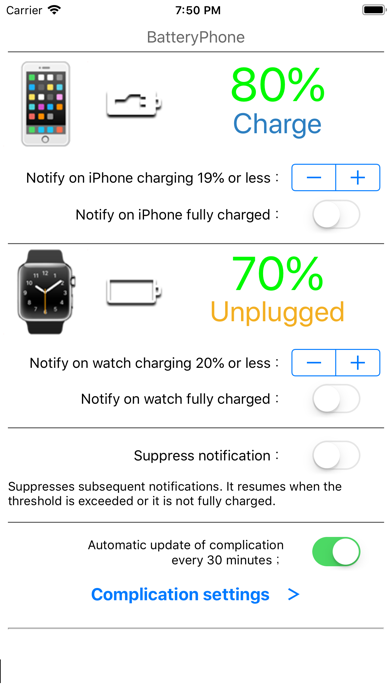
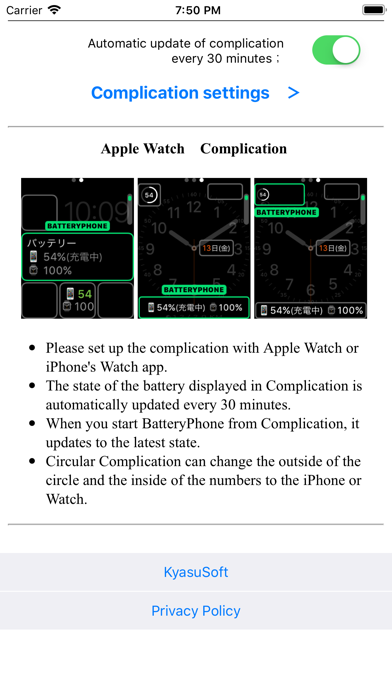
You can check the battery status of your phone and watch with your watch. Compatible with complications (automatic update). You can check the charging amount and charging status of the phone in a timely manner from the clock face. We will notify you by a notification when the charge amount of the phone or watch becomes less than the specified% or becomes full charge. The graph also displays the change in charge level for your phone and watch. - Set up complications with the watch app on your watch or phone. - The battery status displayed in the complication is automatically updated approximately every 12 to 60 minutes. The reason why the update interval has a range is that it depends on Watch OS. If the automatic update has stopped (for example, there is no update for more than 1.5 hour), tap the complication to restart it. In the iPhone app, the latest update time is displayed under the watch's charge status display. - Tap the complication to update to the latest status. - A circular complication can be assigned to the outer circle and the inner number to indicate the battery level of the phone and watch, respectively. -- I am a Japanese developer. The support site can be translated into various languages with the "Translate" option on the right side of the site.
Latest release
What’s New
We've added a graph that displays the change in battery level on your iPhone and Watch. Tapping "AutoUpdate Log" will take you to the display screen. A graph will show the change in battery level over approximately one day. You can also change the auto update interval on this screen. Please note that the update interval is controlled by iOS and may not be accurate.
Audience growth
Ratings growth
Baseline captured. Growth appears after the crawler observes a changed rating count.
Momentum comes from crawler snapshots for the tracked storefront. “Viral growth signal” means unusually fast recent rating gains; it is an indicator, not download data.
Price tracking
Price intelligence
First snapshot captured. The trend line starts after the next crawler price observation.
- First observed Aug 21, 2026 · 11:58 PM Free
Screenshots