About this app
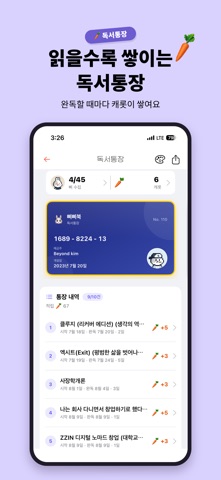
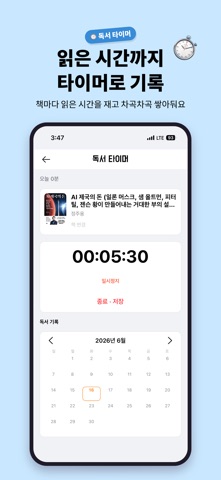
# Ppippi Book — A place to keep track of your reading, build reading habits, and manage your books all in one place Do you want to buy a book, but can’t remember the one you’ve already read? Notes get scattered all over the place, and there are many times when I even forget how many books I’ve read this year. Bbitbbitbook is a reading log app that helps you organize the books you’ve read, are currently reading, and have finished, while also letting you manage your reading notes, statistics, and even a reading calendar all in one place. This is a free reading app recommended for those who want to build a reading habit, decorate their own personal library, or keep a record of their completed reading. @ Why is it a beeper book? • Book search optimized for Korean — search by title, author, or ISBN using the APIs of Kakao, Naver, Aladin, and the National Library of Korea • Quickly register books by scanning barcodes • Organize the bookshelf before reading, while reading, and after finishing the book • Save text and photos together in reading notes — your own reading journal and reading diary • Measure and record the time spent reading today using a reading timer (stopwatch style) • View at a glance which books you read and how many you read on each date in the reading calendar • Analysis of reading statistics by year and month, including completed reading, star ratings, genre, and average reading period • Reading Savings Account — The fun of stacking up books you’ve finished reading like a savings account • Designed to encourage consistent return through attendance checks, Carrot rewards, and consecutive attendance badges • Reading goals — set the number of books to read this year and this month, and check the progress • Share your reading history with a single link using a public profile • Keep your records intact even if you switch devices with Google or Apple sign-in and cloud sync I recommend it for people like this • Those who want to keep their reading records systematically • Those who set reading goals through the complete reading challenge • Those who want to gather their reading notes and memos in one place • Those who need a list of books read, book reviews, and impressions • Those who want to develop a reading habit and a habit of reading books • Those who want to record in Booklog or Readinglog style • Students, working professionals, and parents — anyone can get started for free • Those who want to share books they have read in book clubs or reading groups • Those who need a list of “books read this year” for the year-end
Latest release
What’s New
@ Fixing some minor bugs
Audience growth
Ratings growth
Baseline captured. Growth appears after the crawler observes a changed rating count.
Momentum comes from crawler snapshots for the tracked storefront. “Viral growth signal” means unusually fast recent rating gains; it is an indicator, not download data.
Price tracking
Price intelligence
First snapshot captured. The trend line starts after the next crawler price observation.
- First observed Sep 14, 2026 · 5:10 AM Free
Screenshots