About this app
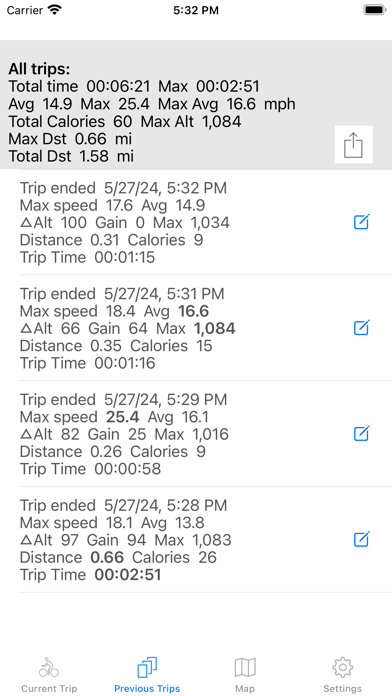
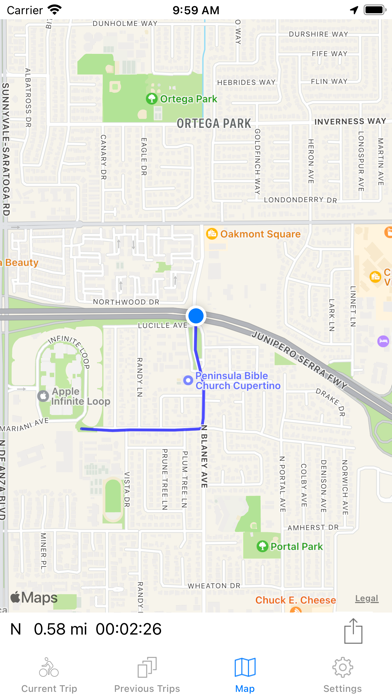
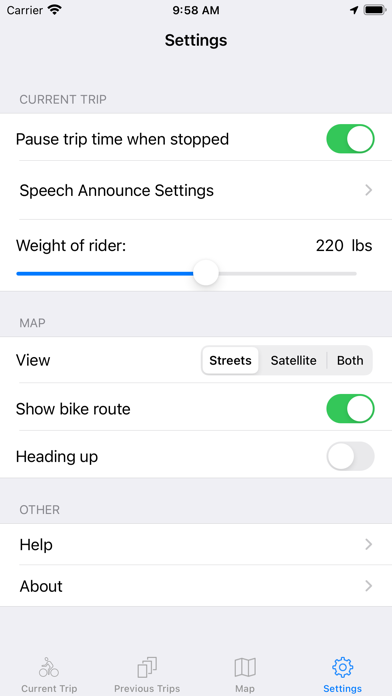
The Best Bike Computer is a biking performance tracking application developed by a biker. It tracks various metrics from your bike ride and saves them for review in Best Bike or export in a CSV file. The exported file can be opened with Excel for detailed analysis. In addition to saving your bike trip data in the application, Best Bike exports it to the Apple Health application (calories burned, cycling distance and workout). The Best Bike user interface is simple and designed for ease of use during a ride but viewing the screen is not necessary; Best Bike will speak the metrics you choose at the time or distance interval you choose. Best Bike can show you your current location on the map and optionally show you where you have been on your ride. Your route on the map can be exported in GPX format. Note: Continued use of GPS running in the background can decrease battery life. Features - Complete description of app on app web site. - GPS-based recording of data for your bike ride. - Displays current speed, altitude, GPS location and… - Records distance, time, max & average speed, delta altitude, maximum altitude, altitude gain, calories. - For "out and back" rides, estimates the time you will return to the starting point. - Uses altimeter hardware on iPhone (if available) to improve altitude metrics. - Calorie calculation based on distance, weight (from Health app if available), speed and gain. - Data from each trip saved in app and in Health app (if available). - Display of summary data from all trips. - Ability to enter a note for each trip. - Data can be exported in CSV format for import into Excel. - Shows your location on map and your route so far. The route can be exported in GPX format. - Map in streets, satellite or both view with north up or heading up orientation. - Voice announcement of trip data at time or distance intervals allows you to ride without looking at display. - Choice of 5, 10, 15 or 30 minute intervals for voice announcement. - Voice announcement is compatible with playing of music during recording of ride. - Choice of metrics announced by voice. - Ability to give announcement at start of trip (to confirm volume level, metrics, etc). - Ability to vibrate before announcement. - Ability to automatically pause recording of ride when bike is stopped. - App runs in background and doesn't interfere with phone calls, etc. - Notification if you have zero speed for 10 minutes without pausing the trip recording. - Ability to change font size on previous trips and settings screens (controlled by iPhone Settings app) - Ability to control the speech rate. - Ability to record lap data and alternate between viewing it and total trip data. - Notification when battery level drops to 30% and 20%. Data Recorded During Your Ride - Current speed - Total distance during ride (saved in Health app) - Total time of ride - Current position (displayed in coordinates and on map) - Where you have been (on map display) - Compass heading - Average speed - Whether your current speed is above or below your average speed (indicated by + or – after current speed) - Whether your average speed is above or below the maximum average speed from all previous trips (+ or - indicator) - Maximum speed - Altitude - Delta altitude (difference between minimum and maximum altitude during ride) - Maximum altitude - Calories burned - Cumulative elevation gain (or altitude gain) - Data calculated for all trips combined: Total time, average speed, maximum speed, maximum average speed, total calories, maximum distance, total distance
Latest release
What’s New
- Fixed defect that was preventing export of data file. - Fixed defect that showed a non-zero speed when stopped.
Audience growth
Ratings growth
Baseline captured. Growth appears after the crawler observes a changed rating count.
Momentum comes from crawler snapshots for the tracked storefront. “Viral growth signal” means unusually fast recent rating gains; it is an indicator, not download data.
Price tracking
Price intelligence
First snapshot captured. The trend line starts after the next crawler price observation.
- First observed Sep 14, 2026 · 5:30 PM Free
Screenshots