About this app
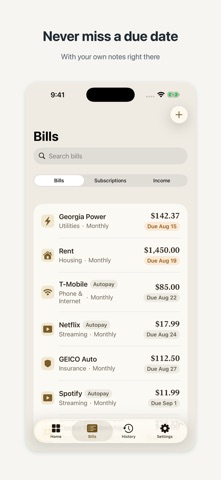
Bill Manager keeps every bill and subscription in one calm place, so you always know what's due, what's paid, and what you can actually save. Add a bill once — name, amount, due date, how often it repeats — and the app tracks it from there. Type a name like "Netflix" or "Verizon" and the official payment link fills in for you. When a bill is due, one tap opens that biller's own website so you can pay them directly. SEE WHERE YOU STAND • What's still due this month, at a glance • Anything overdue, called out clearly • What you've already paid, month by month • Every subscription with its real monthly cost added up KNOW WHAT YOU CAN SAVE • Add your paycheck and anything else that comes in • Weekly, every two weeks, twice a month, or monthly — including the 1st-and-15th schedule most apps get wrong • The app subtracts your bills from your income and shows what's left to put away • If your bills come to more than you earn, it tells you plainly instead of hiding it PAY ON THE BILLER'S OWN SITE Around 70 well-known billers come pre-filled with their official web addresses, and you can add any link yourself. Bill Manager never processes payments, never asks for card or bank details, and never touches your money. It simply takes you to the right page. QUIET REMINDERS Turn on reminders and get a notification a few days before a bill is due, and again on the day. They're scheduled on your device — nothing is sent anywhere. PRIVATE BY DESIGN • No account, no sign-up, no login • No ads, no analytics, no tracking • Your bills stay on your device • Optional sync runs through a private bridge you own and control, not the developer's server WORKS THE WAY YOU DO Designed for iPhone and iPad, with a calm, readable layout that stays out of your way.
Latest release
What’s New
Siri and your monthly review — new in 2.2 • Ask Siri, hands free: "What's due in Bill Manager", "Money summary in Bill Manager", or "Mark a bill paid in Bill Manager". Works on every iPhone — answers come from your own numbers, and marking paid always asks before it acts. • Your monthly review: when a month wraps up, a short story of it appears on Home — what you paid, whether it was all on time, how it compares to the month before, and whether a three-paycheck month is coming. • On iPhones with Apple Intelligence the review is written in a warmer voice, entirely on your device; every figure is still computed by the app. • Plus the Ask tab and smart bill scanning introduced in 2.1, with more accurate date answers.
Audience growth
Ratings growth
Baseline captured. Growth appears after the crawler observes a changed rating count.
Momentum comes from crawler snapshots for the tracked storefront. “Viral growth signal” means unusually fast recent rating gains; it is an indicator, not download data.
Price tracking
Price intelligence
First snapshot captured. The trend line starts after the next crawler price observation.
- First observed Aug 24, 2026 · 8:53 AM Free
Screenshots