About this app
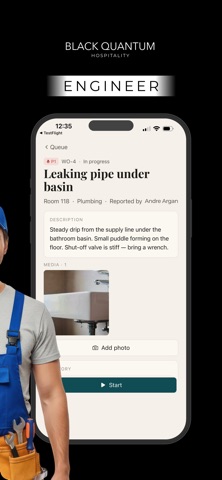
Get through your shift faster, with less back-and-forth. BlackQuantumOS keeps everything hotel staff need in one simple app — the rooms to clean, the repairs to fix, and the guests to check in. No paper lists, no radio chatter, no guessing what’s next. Just open the app and see your work for the day. Made for the people on the floor: clear, fast, and easy to read on the move, in any of 7 languages. BUILT AROUND YOUR ROLE Housekeeping — See the rooms assigned to you today, follow a step-by-step cleaning checklist, and time each clean. Attach photos or video, then mark a room ready for inspection. Spot a problem? Report it to maintenance in seconds. Engineering — Work a live queue of maintenance jobs. Claim a task, move it from start to resolved, note when you’re waiting on parts, and add photo evidence as you go. Create new work orders on the spot. Front desk — See today’s arrivals and occupancy at a glance. Scan a guest’s arrival QR code to pull up their room and reservation instantly, then check them in — all in a few taps. WHY STAFF LIKE IT • One app, three roles — switch your active role in Settings if you do more than one job • Simple checklists so nothing gets missed • Report and track maintenance issues without leaving the floor • Fast guest check-in with QR scanning • Your weekly shifts, always in your pocket • Works offline and syncs automatically when you’re back online • Clear, plain wording in 7 languages: English, German, Spanish, French, Italian, Russian, and Armenian HOW TO GET STARTED BlackQuantumOS is a staff tool for your hotel. Sign in with the staff account provided by your employer. If you don’t have login details, ask your manager or front-office lead. Note: this app is for hotel staff and requires a staff account. It is not for guest bookings.
Latest release
What’s New
One app now works for every hotel. • On first launch, enter your hotel code to connect to the right property. • The login screen shows your hotel name after the code is accepted. • Switch hotel from the login screen or Settings if you work at more than one property (you will sign in again). • Clearer messages when a code is wrong, the hotel is not set up yet, or the network is down.
Audience growth
Ratings growth
Baseline captured. Growth appears after the crawler observes a changed rating count.
Momentum comes from crawler snapshots for the tracked storefront. “Viral growth signal” means unusually fast recent rating gains; it is an indicator, not download data.
Price tracking
Price intelligence
First snapshot captured. The trend line starts after the next crawler price observation.
- First observed Aug 12, 2026 · 1:56 PM Free
Screenshots