About this app
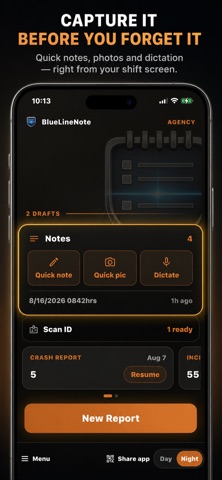
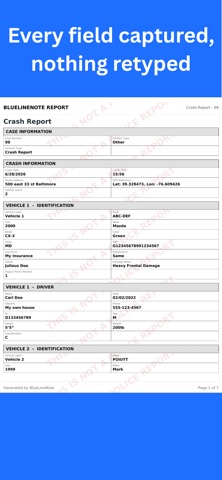
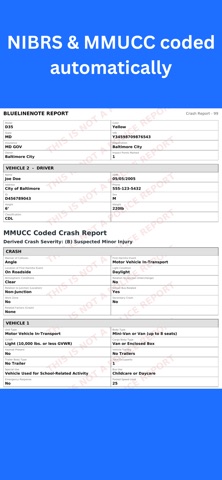
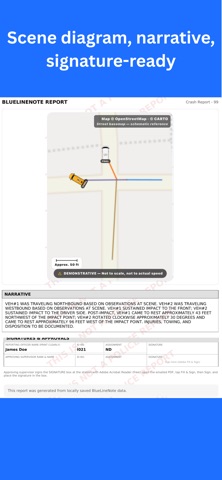
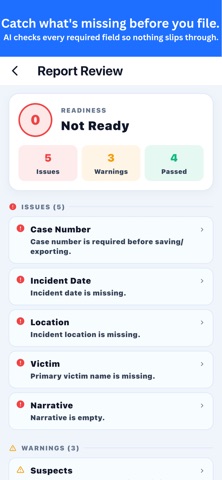
BlueLineNote — professional report writing and incident documentation for law enforcement. Capture, review, and export detailed reports directly from the field. From documenting an incident to working a crash scene, BlueLineNote helps you write clear, complete reports fast — and keeps everything organized and on your device. Built for high-pressure environments, where documentation gets done between calls, not at the end of the shift. REPORT WRITING & DOCUMENTATION - Incident reports and structured documentation - NIBRS-ready incident documentation - Crash reports with collision documentation - MMUCC crash coding - Investigations — leads, interviews, timeline, and case notes - Insights — surfaces patterns across multiple reports to support investigative work - AI report review — flags what still needs attention so the report goes out complete - Narrative templates — offense-specific templates populate into the narrative - Voice-to-text dictation - OCR ID and registration scanning - On-scene signature capture SCENE RECONSTRUCTION - V.E.R.A. crash reconstruction system - Aerial view scene mapping - Vehicle replay and movement animation - Multi-vehicle reconstruction support - Vehicle path and direction tracking - Impact point placement - Tactical scene mapping - Drag-and-drop scene objects - Tactical and Clear View modes REPORTS & RECORDS - Professional PDF report export - Photo attachment support - Saved case file management - Backup & restore — password-protected encrypted backup file you control - Location and scene documentation YOUR DATA, YOUR DEVICE BlueLineNote stores your reports locally on your device. Nothing leaves your phone unless you choose to export it. Designed by a 30-year law enforcement veteran who understands what documentation needs to hold up — in the field and in the file. Terms of Use (EULA): https://www.apple.com/legal/internet-services/itunes/dev/stdeula/ Privacy Policy: https://marioavera.github.io/bluelinenote-privacy/
Latest release
What’s New
Apply a saved scan without hunting for it. Tap Apply from the home screen and choose where it goes — a new report, or one you already started. The scan data lands in the report ready to assign to a person. Also in this release: a refreshed look across the app, a clearer day/night control, and a home screen that opens with what you have left to finish.
Audience growth
Ratings growth
Baseline captured. Growth appears after the crawler observes a changed rating count.
Momentum comes from crawler snapshots for the tracked storefront. “Viral growth signal” means unusually fast recent rating gains; it is an indicator, not download data.
Price tracking
Price intelligence
First snapshot captured. The trend line starts after the next crawler price observation.
- First observed Aug 23, 2026 · 1:23 PM Free
Screenshots