About this app
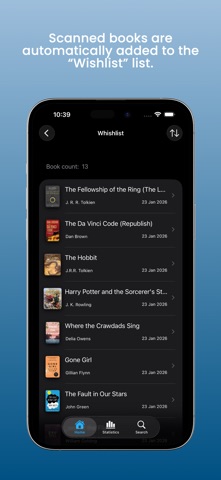
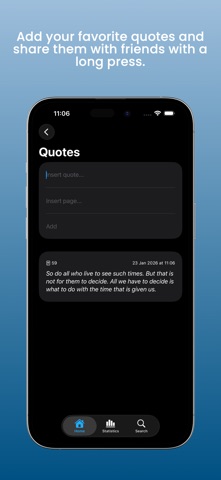
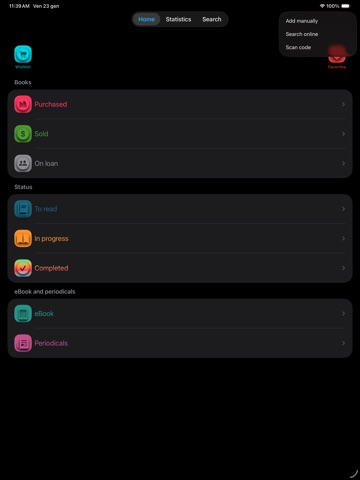
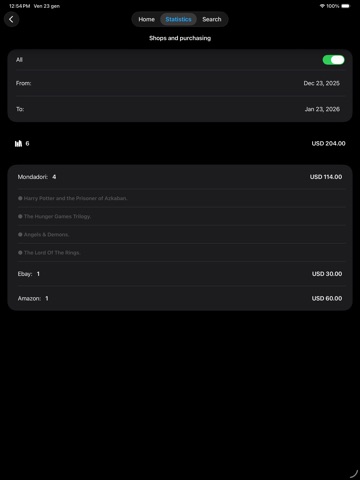
With Bookslot Lite, managing books and reading has never been easier! Every feature is designed to help you organize your collection and track your reading progress. FREE VERSION You can catalog up to 50 books, using intuitive tools and smart lists that simplify the management of your titles. Free of ads and designed to offer a simple and fluid experience, Bookslot Lite allows you to manage your collection with total freedom. If you need to manage larger libraries or want advanced features, you can discover Bookslot, designed for those with broader needs. ADD BOOKS You have 3 options to choose from: • Manual • Online search (by title, author or ISBN) • Barcode scanning BOOK MANAGEMENT Organize your books with 10 smart lists: • Wishlist • Favorites • Purchased • Sold • Loaned • To Read • In Progress • Completed • eBooks • Periodicals Each book is automatically assigned to the right list. For example, if you add a book without marking it as “Purchased”, it will end up in the “Wishlist” list. When you purchase it, just click on “Purchased” to move it to the correct list. You can also save information such as purchase date, price and store. DYNAMIC VIEW The app adapts to you! Only display relevant information, for example: if a book has not been purchased, you will not see sections such as purchase or reading progress. Likewise, the sale section will only be visible for books marked as sold. This principle applies to all information related to ownership (such as books wanted, purchased, sold or loaned) and/or reading status, offering a fluid, intuitive and natural experience. TRACK YOUR PROGRESS Reading a new book? Select “In Progress”, start the timer and enjoy reading. At the end, stop the timer and update the number of pages read to always stay on top. QUOTES For each book, you can save your favorite quotes, including the text and page number. To share a quote, just long-press it and select “Share”: Bookslot will automatically create a ready-to-send image containing the book title, the quote, its page number, and the sharing date. A quick way to save and share the words that touched you most. READING STATS Curious to know how much you read? Select a period, consult the graph and find out how many books you have completed, how much time you have spent reading and how many pages you have read. TRACK YOUR PURCHASES Check your expenses and the stores where you have purchased your books. You can view all purchases or filter by period. Want the details of a specific store? Click and get the list of titles purchased there right away. LOCAL SEARCH Find any book in your library! Search by title, author, series or ISBN. The icons next to the details show you at a glance which list it is in. You can also decide whether to search everywhere or in a specific list. OTHER FEATURES • Export: save your list in a CSV file format to use it wherever you want. • Reading reminders: Set a reminder to not forget to read. TIPS Here are 3 useful tips: 1. When you create a new book, to save it in memory you need to click on the “Save” button at the top right of the navigation bar. 2. If you need to make multiple changes, make them all and once done click on the “Save” button. 3. If the "Save" button is not enabled, don't worry, it means that there are no changes to save or that the saving was automatic. For any problem, please contact me at: bookslotsupport@createbycoding.it. If you have any suggestions, requests or if you simply want to share some thoughts on your readings, contact me at: letstalk@createbycoding.it. Happy reading!
Latest release
What’s New
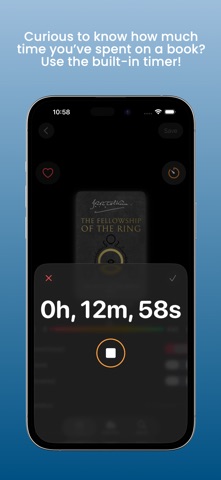
Bookslot Lite is updated! Full support for iOS 26 and the new Liquid Glass design. Main Features • Reading information section at the top: easy and immediate access. Thanks to dynamic section management, it is visible only for books with status “In Progress” or “Completed.” • Redesigned progress bar: now below the cover, with a more minimal and clear design. • Redesigned timer: button at the top right above the cover. The dedicated window shows reading time in larger dimensions adapted to the screen, making the timer simple and accessible to everyone. Other • Minor bug fixes, including one that sometimes prevented the progress bar from updating correctly. More updates coming soon! For questions or suggestions: letstalk@createbycoding.it
Audience growth
Ratings growth
Baseline captured. Growth appears after the crawler observes a changed rating count.
Momentum comes from crawler snapshots for the tracked storefront. “Viral growth signal” means unusually fast recent rating gains; it is an indicator, not download data.
Price tracking
Price intelligence
First snapshot captured. The trend line starts after the next crawler price observation.
- First observed Aug 21, 2026 · 8:32 PM Free
Screenshots