About this app
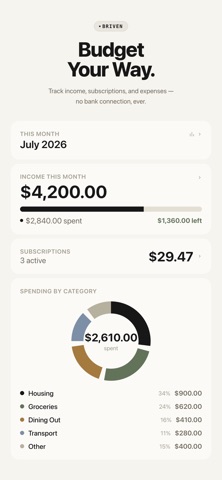
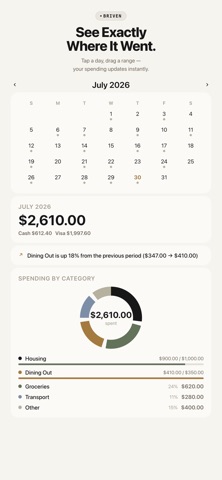
Briven is a manual budgeting app for people who want structure, not surveillance. There's no bank connection. No CSV or OFX import. No account to sign up for. You enter your income, subscriptions, and expenses yourself — and Briven turns that into a clear, honest picture of where your money goes every month. WHY MANUAL? Every "smart" finance app promises to auto-categorize your spending by reading your bank transactions. That convenience comes at a cost: your bank credentials and full transaction history now live on someone else's server. Briven skips that trade entirely. Nothing you enter ever leaves your device unless you choose to sync it — and even then, it only goes to your own private iCloud, never to us. WHAT YOU CAN DO • Track multiple income sources — a full-time job, freelance work, anything else — each with its own schedule (weekly, monthly, yearly, or irregular) • Log every subscription with its billing date; Briven detects price increases automatically and alerts you the moment they happen • Record expenses in seconds, organized into categories and subcategories (or your own custom ones) • Tag expenses by payment method — cash, or any card you add • See your month at a glance: income vs. spending, category breakdowns, and a calendar you can tap or drag to inspect any day or range • Set a monthly budget per category and watch a simple progress bar warn you before you go over PRIVATE BY DESIGN • No account, no login, no bank linking — ever • Your data lives on your device • Free iCloud sync keeps your own devices in sync with each other — never shared with anyone else • Optional Face ID / Touch ID app lock, processed entirely on-device FREE TO USE Unlimited expense logging, income tracking, subscription tracking (up to 5), categories, payment methods, iCloud sync, and monthly reports — all free, no ads. Briven doesn't guess what you spent money on from a bank feed. You tell it — and that's exactly the point.
Latest release
What’s New
Smarter subscriptions and smarter categories. • Subscriptions now show when each one bills next, plus your total annual cost at a glance. • Adding an expense with a memo you've used before now suggests the category you picked last time. • Set a monthly budget on a category and get notified the moment you go over. • Income sources can now remind you the day before you're paid. Also includes dark mode contrast fixes and a smoother, faster expense entry screen.
Audience growth
Ratings growth
Baseline captured. Growth appears after the crawler observes a changed rating count.
Momentum comes from crawler snapshots for the tracked storefront. “Viral growth signal” means unusually fast recent rating gains; it is an indicator, not download data.
Price tracking
Price intelligence
First snapshot captured. The trend line starts after the next crawler price observation.
- First observed Aug 24, 2026 · 3:48 AM Free
Screenshots