About this app
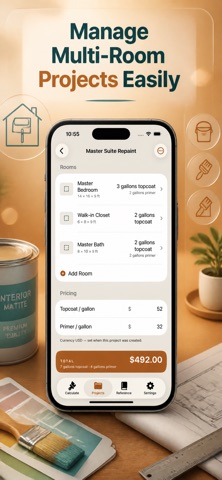
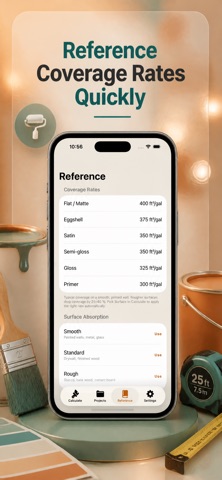
What does BrushKit do? BrushKit calculates exactly how many gallons of paint and primer you need for any room, wall, ceiling, or trim — interior or exterior — with industry-standard coverage rates and 10% waste built in. Save multi-room projects and export PDF reports. Is my data private? 100% offline. Nothing leaves your iPhone. No accounts, no analytics, no ads. How do I get started? 1. Pick a room template (Bedroom, Bath, Kitchen, Living, Hallway) or enter custom dimensions. 2. Or scan the room with LiDAR on iPhone Pro for instant measurements. 3. Pick coats, surface type, whether to include ceiling, trim, and primer. 4. Get gallons, smart can combinations, and total project cost in seconds. What can I do with it? - Calculate paint for walls, ceilings, and trim - Switch between interior and exterior modes with correct coverage rates - Scan rooms with LiDAR on iPhone Pro (12 Pro and newer) - Subtract doors and windows automatically - Get smart can combinations (e.g. 3 gal + 1 quart, leftover 0.2 gal) - Estimate primer separately at the correct coverage rate - Save multi-room projects with cost totals - Export project reports as PDF - Switch between imperial and metric units - Reference chart for paint finishes, surface types, and coats What languages does it support? English, German, French, Spanish, and Japanese. How much does it cost? 3-day free trial, then $1.99/week, $4.99/month, $29.99/year, or $79.99 lifetime. Terms of Use: https://taxlite.net/brush_kit/terms.html Privacy Policy: https://taxlite.net/brush_kit/privacy.html
Latest release
What’s New
BrushKit 1.3.0 turns your quoting toolkit into a full sales pipeline: • NEW Price Book — save your own reusable line items (power washing, cleanup fees, and more) and drop them into any quote • NEW Paint brand, sheen, and color name shown right on the quote's materials line • NEW Quote pipeline — track Draft → Sent → Won/Lost → Scheduled → Completed, with a win-rate and pipeline-value dashboard • NEW Follow-up reminders surface quotes that have gone quiet, with optional notifications • NEW Deposit / progress billing — split a job into deposit, progress, and final invoices • NEW Export your project pipeline as CSV for spreadsheets and bookkeeping • NEW Camera-based room scanning for iPhones without LiDAR • NEW Optional iCloud sync keeps projects up to date across your devices • Keyboard, tap-target, and paywall polish throughout No ads, no tracking, no third-party accounts. iCloud sync (if you turn it on) uses only your own Apple ID.
Audience growth
Ratings growth
Baseline captured. Growth appears after the crawler observes a changed rating count.
Momentum comes from crawler snapshots for the tracked storefront. “Viral growth signal” means unusually fast recent rating gains; it is an indicator, not download data.
Price tracking
Price intelligence
First snapshot captured. The trend line starts after the next crawler price observation.
- First observed Aug 24, 2026 · 4:12 AM Free
Screenshots