About this app
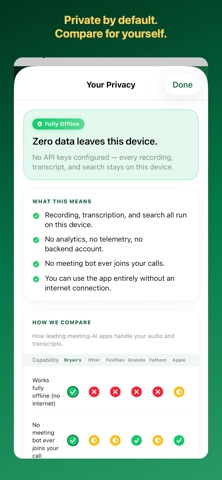
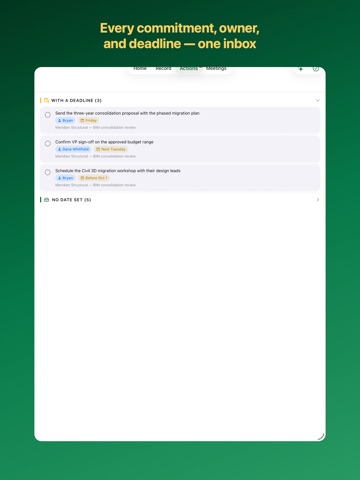
Bryan's Notes records, transcribes, and makes sense of your meetings — on iPhone, iPad, Mac, and Apple Watch — without sending them to anyone. PRIVATE BY DEFAULT Most meeting apps upload every recording to their servers. Bryan's Notes doesn't. With no API key set up, the app is fully offline — every recording, transcript, and search stays on your device. No account. No sign-up. No server. Ever. RECORD FROM YOUR WRIST Bryan's Notes has a real Apple Watch recorder. Tap once on your watch — in the hallway, on a job site, walking out of a meeting — and the recording hands itself off to your iPhone, where it becomes a full transcript with AI notes. Your phone doesn't even need to be in the room. RECORDINGS THAT DON'T DROP A call comes in, the screen locks, you switch apps — your recording keeps going. Pause and resume right from your lock screen. You never lose a meeting to an interruption. CAPTURE BOTH SIDES OF A CALL Turn on Remote Meeting capture to record video calls — the far end's audio plus your mic — on iPhone, iPad, or Mac. Audio only by design: your screen is never recorded. Transcripts label who said what, you or them. Recording consent stays your responsibility where laws require it. AI WHEN YOU WANT IT Add your own Claude API key for summaries, key points, decisions, and action items — plus Ask G2, which answers questions across your whole meeting history in plain language. You choose exactly what's shared, and you can turn it off anytime. STAY ON TOP OF THE FOLLOW-THROUGH Every action item from every meeting, gathered on one Actions screen. Check things off, and Home's Follow-Ups keeps what's still open in front of you. SYNC ACROSS YOUR DEVICES Meetings sync between your iPhone, iPad, and Mac through your own iCloud — never our servers. Syncing the audio itself is a separate switch you control. WORKS EVERYWHERE YOU DO Edit transcripts. Search everything. Use Siri and Shortcuts. Import recordings from Otter, Zoom, Teams, and more; export to Apple Notes, email, or Word. On your Mac, you can even connect AI agents like Claude to your local meeting history — optional and off by default. NO TRACKING. NO ADS. NO CATCH. No analytics, no advertising. A tool you own, not a service that watches you. Record your first meeting in seconds.
Latest release
What’s New
Meet Ask G2 — and a sharper Bryan's Notes on every screen. • Ask Anything is now Ask G2: the same private, on-device answers across your whole meeting history, under the name it deserves • Meetings name themselves — recordings get a smart title automatically, so your list stops filling up with "New Meeting" • A redesigned Mac workspace: three-pane layout, a bolder Bryan's Notes sidebar with the Hen Solutions mark, and brand-green styling throughout • The recording capture bar appears only while you're actually recording — and no longer overlaps the tab bar on iOS 26 • Settings now leads with the brand card, plus stability and polish fixes across iPhone, iPad, Mac, and Apple Watch
Audience growth
Ratings growth
Baseline captured. Growth appears after the crawler observes a changed rating count.
Momentum comes from crawler snapshots for the tracked storefront. “Viral growth signal” means unusually fast recent rating gains; it is an indicator, not download data.
Price tracking
Price intelligence
First snapshot captured. The trend line starts after the next crawler price observation.
- First observed Aug 8, 2026 · 11:53 PM Free
Screenshots