About this app
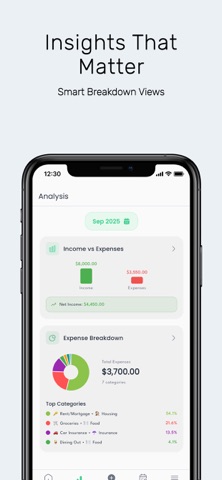
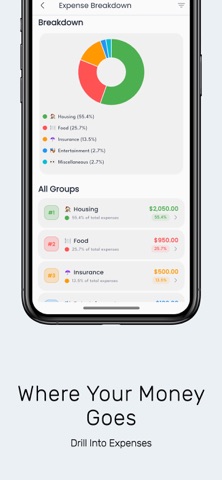
Budgetelo turns budgeting into calm, confident decision‑making. See your total balance, money waiting to be allocated, and category plans in one clear view—so you always know what’s assigned, what’s spent, and what’s left. Understand your money at both a glance and in depth. Switch between Income vs Expense and Expense Breakdown to spot trends fast, then drill down to the details that drive better choices. Explore categories with clean history and remaining balances, view daily spending on a calendar, and analyze multi‑month patterns with a focused line chart and summary. What you get: Clear home dashboard: total balance, to‑allocate funds, and category progress (planned, spent, remaining) Smart analysis: quick tabs for Income vs Expense and Expense Breakdown with ready‑to‑use charts Visual clarity: pie charts for where your money goes, bar charts for monthly comparisons, line charts for trends over time Category deep dives: transaction history, limits, and what’s still available—light and dark mode included Calendar view: see spending by date to plan ahead and avoid surprises Period insights: analyze custom ranges (e.g., last 6 months) with concise, actionable summaries Make every dollar work toward your goals. Plan with confidence, adjust with insight, and stay on track—one clear screen at a time.
Latest release
What’s New
What's New Premium — unlock advanced features with a subscription. Redesigned home screen widget — cleaner layout. Smarter transactions — payee-based category suggestions, plus active filter chips in history. Quick target access from the allocation sheet, and multiply/divide on the keypad. Fixes — sign-out reliability, network handling, misc bug fixes.
Audience growth
Ratings growth
Baseline captured. Growth appears after the crawler observes a changed rating count.
Momentum comes from crawler snapshots for the tracked storefront. “Viral growth signal” means unusually fast recent rating gains; it is an indicator, not download data.
Price tracking
Price intelligence
First snapshot captured. The trend line starts after the next crawler price observation.
- First observed Sep 3, 2026 · 11:52 PM Free
Screenshots