About this app
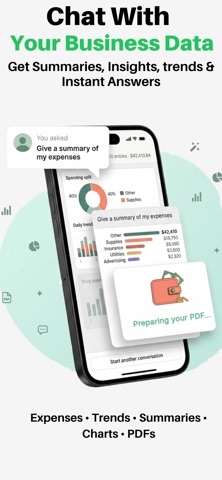
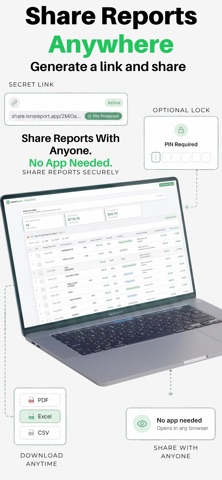
Turn Paperwork Into Business Records Stop typing data into spreadsheet. LensReport uses AI to scan receipts, invoices, forms and business documents, automatically extracting the information into structured reports you can update over time. Ask AI questions about your reports, collaborate with your team and export to Excel, PDF or CSV in seconds. Whether you're tracking expenses, fuel, deliveries, invoices, inspections or custom workflows, LensReport turns paperwork into organised business records. Why Businesses Choose LensReport • Replace hours of manual data entry • Scan receipts, invoices, forms and documents • AI extracts and organises your data automatically • Ask AI questions about your reports • Share reports with anyone using a secure web link • Export to Excel, PDF and CSV • Build reports your team updates together • Create custom reports with formulas and calculations How It Works Choose a ready-made template or create your own. Scan any document. AI extracts the data and updates your report. Ask AI questions, collaborate with your team or export your report. AI Insights Your reports become searchable business data. Ask questions like: • How much did I spend on fuel this month? • Which supplier costs me the most? • Summarise this report. • Show spending trends. • Create a PDF summary. AI answers instantly using the data already stored in your reports. Built For Small Businesses LensReport includes 175+ ready-made templates, including: • Expense Reports • Fuel Logs • Mileage Trackers • Sales & Invoice Logs • Delivery Logs • Loan Payment Trackers • Staff Reimbursements • Contractor Jobs • Property Inspections • Inventory Or create your own custom reports with Smart Columns, formulas and automatic calculations. Team Collaboration Keep everyone on the same report. • Team members scan from anywhere. • Reports update instantly. • Receive notifications for new entries. • Track Paid, Pending, Approved and Overdue items. • Approval workflows built in. Share Anywhere Generate secure browser links that anyone can open. No app required. Perfect for sharing reports with accountants, clients, auditors and your team. Export anytime to: • Excel • PDF • CSV • Google Sheets • Apple Numbers Privacy & Security • Documents are processed using encrypted AI services. • Images are handled under zero-data-retention agreements and are never used to train AI models. • Sensitive information is removed before AI Insights requests. • Delete your account and data at any time. • No ads. We never sell your data. Perfect For • Small businesses • Contractors • Tradespeople • Freelancers • Property managers • Delivery teams • Sales teams • Field workers • Bookkeepers • Accountants Subscription LensReport offers an auto-renewing subscription. Payment is charged to your Apple Account and renews automatically unless cancelled at least 24 hours before the end of the current billing period. Manage your subscription anytime in your App Store account settings. LEGAL Terms of Use (EULA): https://lensreport.app/terms Privacy Policy: https://lensreport.app/privacy
Latest release
What’s New
Performance Improvement
Audience growth
Ratings growth
Baseline captured. Growth appears after the crawler observes a changed rating count.
Momentum comes from crawler snapshots for the tracked storefront. “Viral growth signal” means unusually fast recent rating gains; it is an indicator, not download data.
Price tracking
Price intelligence
First snapshot captured. The trend line starts after the next crawler price observation.
- First observed Aug 21, 2026 · 2:58 PM Free
Screenshots