About this app
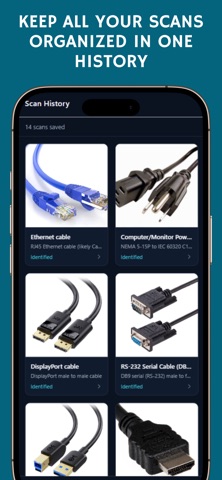
Not sure which cable or adapter you need? Cable & Port Identifier helps you figure it out fast. Take a photo and get: Port or connector identification Commercial name users recognize Basic compatibility guidance (example: USB-C to HDMI) Clear “What to buy” recommendations Scan history to revisit past results How it works: Scan a cable, connector, or port with your camera Get instant AI-powered identification Check compatibility and buy the right cable or adapter Great for: USB-C, HDMI, Lightning, DisplayPort, USB-A and more Laptops, phones, monitors, docks, chargers, TVs, and accessories Avoiding wrong purchases and return hassles Why users love it: Fast, simple, and practical Designed for real purchase decisions Built to reduce confusion before you buy Download Cable & Port Identifier and find the exact cable or adapter with confidence. Terms of Use: https://www.apple.com/legal/internet-services/itunes/dev/stdeula/ Privacy Policy: https://privacydeisy.netlify.app/
Audience growth
Ratings growth
Baseline captured. Growth appears after the crawler observes a changed rating count.
Momentum comes from crawler snapshots for the tracked storefront. “Viral growth signal” means unusually fast recent rating gains; it is an indicator, not download data.
Price tracking
Price intelligence
First snapshot captured. The trend line starts after the next crawler price observation.
- First observed Aug 20, 2026 · 4:02 PM Free
Screenshots