About this app
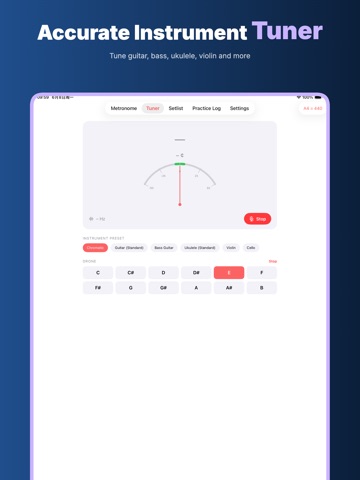
Cadenza is a focused metronome, tuner and practice companion for musicians who want to open one app and start working. It is made for daily practice, lesson warmups, ensemble rehearsals, auditions, choir preparation, studio sessions and quiet at-home repetition. The interface stays calm: a large BPM display, clear controls, a responsive tuner, setlist notes and a practice log without account setup getting in the way. Cadenza is built around five practical promises: Offline, No Login, Privacy First, On Device, No Cloud Upload. An active subscription is required to use Cadenza, but you do not need to create an app account. Tempo choices, tuning work, setlist details and practice history are meant to stay on your iPhone. Cadenza does not turn a rehearsal into a cloud workspace, and it does not require uploading audio or practice notes just to tune, count or keep time. Metronome for real practice Set a tempo from 20 to 240 BPM, nudge it one beat at a time, or move quickly with the slider. The big number is readable from a music stand, piano bench, desk or rehearsal room floor. Tempo names such as Largo, Andante, Allegro, Presto and Prestissimo give quick musical context instead of leaving you with only a number. Tap Tempo lets you tap the beat you feel and turn it into a BPM value when you are learning from a recording, matching a conductor, or finding the natural pace of a phrase. Common time signatures are ready, including 2/4, 3/4, 4/4, 5/8, 6/8, 7/8, 9/8, 11/8 and 12/8. Beat dots show the shape of the bar. Tap a dot to cycle accents from strong to medium, weak or silent, so you can make simple bars, compound meters, odd meters, subdivision drills and accent studies feel closer to the music you are actually practicing. Tempo Ramp helps build speed with control. Choose a starting BPM, an ending BPM and how many bars the ramp should take. Use it for scales, etudes, double-tonguing, picking exercises, bowing patterns, rhythm studies or any passage that needs gradual speed rather than a sudden jump. The goal is steady progress, not guessing whether the tempo changed too fast. Tuner and reference tones The tuner listens with the microphone and shows the nearest note, frequency and cents offset. Use the chromatic mode for voice, winds, brass, strings, percussion tuning references or any pitch you want to check. Instrument presets for guitar, bass guitar, ukulele, violin and cello make it easier to think in familiar strings. A4 reference choices include 432, 440, 441, 442, 443 and 444 Hz, useful for different ensembles, teachers and rehearsal standards. Cadenza also includes drone tones. Play a sustained reference note when you want to tune by ear, check intonation, practice long tones, settle a scale, hear intervals against a root, or train your pitch center without staring at a needle the whole time. Setlist for rehearsal memory Save pieces with title, composer, BPM, time signature, key and notes. Load a piece directly into the metronome when rehearsal moves quickly. This is useful for bands, choirs, worship sets, orchestra excerpts, theater pits, lesson plans and personal routines where every piece has a different tempo or meter. Offline: core tools are available for everyday practice without relying on a web account. No Login: open the app and use the metronome, tuner, setlist and practice log without sign-in. Privacy First: the product is designed around minimal data needs and clear local workflows. On Device: tuning, tempo work, setlists, settings and practice history are handled on your device. No Cloud Upload: Cadenza does not upload your tuner audio, metronome use, setlists or practice logs to its own cloud. Privacy Policy https://5gotogo.github.io/Cadenza-privacy/privacy-policy.html Terms of Use https://www.apple.com/legal/internet-services/itunes/dev/stdeula/
Latest release
What’s New
This version adds subscription information, improves the practice log experience, adds iPad support, and includes performance optimizations.
Audience growth
Ratings growth
Baseline captured. Growth appears after the crawler observes a changed rating count.
Momentum comes from crawler snapshots for the tracked storefront. “Viral growth signal” means unusually fast recent rating gains; it is an indicator, not download data.
Price tracking
Price intelligence
First snapshot captured. The trend line starts after the next crawler price observation.
- First observed Aug 11, 2026 · 8:03 AM Free
Screenshots