About this app
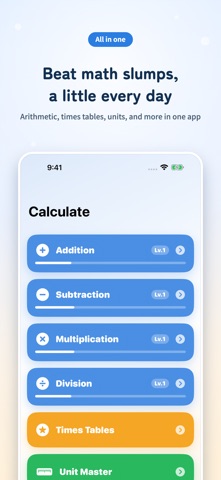
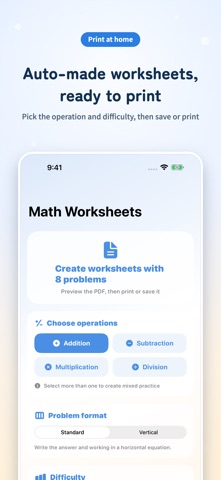
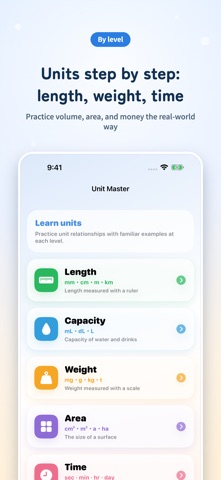
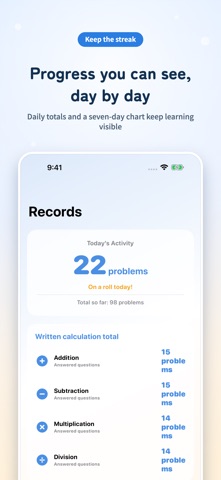
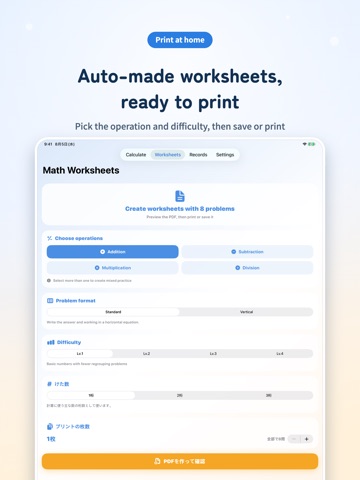
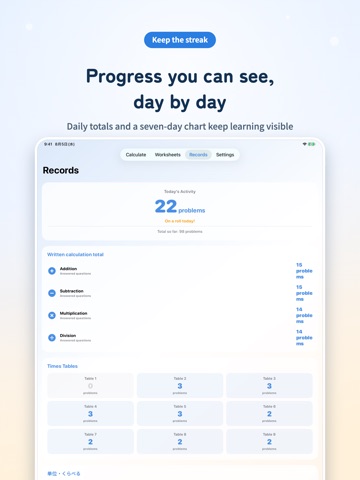
CalcMaster is a math practice app for column arithmetic, times tables, and printable worksheets you can make yourself. Just like solving problems in a paper notebook, you write your working out on the handwriting canvas and enter the final answer with the on-screen keypad. It works smoothly with Apple Pencil or a finger, so practice can happen anywhere. [Great for anyone who wants to] Master carrying and borrowing in column arithmetic Memorize times tables in short, focused sessions Practice at their own pace without paper worksheets Build a steady daily math habit [Column Arithmetic] Practice addition, subtraction, multiplication, and division in classic vertical (column) format. The handwriting canvas features a grid-paper background and an optional column-alignment guide, ideal for learning to line up digits correctly. [Times Tables Master] Choose a specific table (1 through 9) for focused drill, or pick Mix mode to shuffle all 81 questions together. Streak counters, per-table completion dots, and gentle hints help keep motivation high. [Math Worksheets] Generate addition, subtraction, multiplication, and division problems as a PDF and print them as paper drills. Just pick the operations, format (equation or column), difficulty, number of digits, and pages to create your own custom worksheets — handy for homework and home study. [Units Master] A reference mode for units of length, volume, weight, area, and time, shown alongside a sense of real quantity so kids can grasp how units work intuitively. [Compare Master] A game-style quiz for comparing which number or quantity is larger, building a feel for numbers while having fun. [4-Level Difficulty System] Question difficulty automatically expands as you answer more correctly. Lv.1: 2-digit plus 1-digit basics Lv.4: 3-digit plus 3-digit challenges Smooth, achievable progression builds real confidence. [Records Screen] See today's question count, lifetime totals per operation, per-table progress for times tables, and a 7-day bar chart. Your effort is visualized, giving you a clear reason to come back tomorrow. [Instant Feedback] A satisfying animation greets every correct answer, while a gentle shake signals a miss. The app moves to the next question automatically, keeping practice quick and rhythmic. [Designed with Care] Optimized layouts for both iPhone and iPad Simple, distraction-free interface Progress is saved on-device and can be reset anytime Five minutes a day is all it takes to build math confidence. Start your daily practice habit with CalcMaster today.
Latest release
What’s New
Minor bug fixes and performance improvements.
Audience growth
Ratings growth
Baseline captured. Growth appears after the crawler observes a changed rating count.
Momentum comes from crawler snapshots for the tracked storefront. “Viral growth signal” means unusually fast recent rating gains; it is an indicator, not download data.
Price tracking
Price intelligence
First snapshot captured. The trend line starts after the next crawler price observation.
- First observed Sep 4, 2026 · 7:44 AM Free
Screenshots