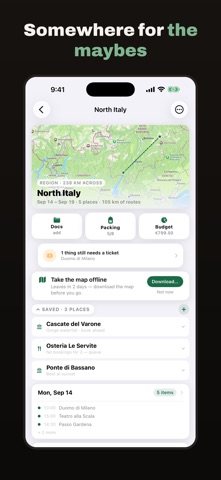
About this app
Camipack is the trip planner that's actually yours. No account, no ads — and your plans never leave your family's own iCloud. PLAN ON A LIVING MAP Every trip opens on a map that grows with your plan. Add places, restaurants, walks and tickets to each day; numbered pins match your timeline, and walking routes are drawn street by street. MAPS THAT WORK OFFLINE Download a trip's map once (a city is about 10–40 MB) and it keeps working in Airplane Mode — streets, labels, your pins and your routes. No signal abroad, no roaming, no problem. PLAN TOGETHER Share a trip with your family and edit it together. Changes sync within moments through iCloud, with a badge showing who changed what. Stop sharing any time. PACKING, PER PERSON One shared packing list plus a personal list for every family member. Check things off and watch the packed counter climb. BUDGET IN ANY CURRENCY Hotel in euros, museum in pounds, flights in shekels — record what you paid and in which currency, alongside what it counts as in your trip's currency. Camipack keeps both, and the totals stay in one currency so they always add up. DOCUMENTS WHERE YOU NEED THEM Attach tickets and bookings to the day they belong to. Camipack reads them and fills in times and addresses — only into fields you left empty. AND THE REST • The whole trip in your calendar, with alerts • A Home Screen widget with the countdown — or today's route • Trip templates and duplication for the yearly favourites • Export any trip as a single file: the full plan with documents PRIVATE BY DESIGN No servers. No account. No analytics. No ads. Your data lives on your devices and in your own iCloud — we couldn't read it if we wanted to. Made by a family, for families.
Latest release
What’s New
TODAY'S PLAN, ON THE HOME SCREEN Three new widgets. The large and medium ones list today's stops in order, with what the day has cost so far. The small one shows only the next place — where it is, when you're due there, how far it is. And one that opens the camera straight onto a receipt, because the moment to photograph one is while you're still holding it. THE NEXT TURN, ACROSS THE TOP Walking directions now put the instruction where you actually look: a banner along the top of the map, the way every navigation app does it, instead of a bar at the bottom of the screen. TURNS YOU CAN SEE, AND FEEL A turn is named after something you can see when there is something worth naming — left at the pub, rather than left in 40 metres. Your phone can also tap the turn out in your pocket: twice for left, three times for right, one long buzz on arrival. Enough to follow a route without looking at anything. THE MAP TURNS WITH YOU While you are following a route the map faces the way you are walking, with a tap to point it back to north. It also remembers where you actually went — a dotted trail behind you, and the offer to walk it back exactly the way you came, which is the part of an unfamiliar city people get wrong. A WALK THAT CAN REFUSE THE STAIRS Walking routes can now avoid steps altogether: for a pram, for a suitcase, or for anyone who would rather not carry either up a station staircase.
Audience growth
Ratings growth
Baseline captured. Growth appears after the crawler observes a changed rating count.
Momentum comes from crawler snapshots for the tracked storefront. “Viral growth signal” means unusually fast recent rating gains; it is an indicator, not download data.
Price tracking
Price intelligence
First snapshot captured. The trend line starts after the next crawler price observation.
- First observed Sep 17, 2026 · 1:43 PM Free
Screenshots