About this app
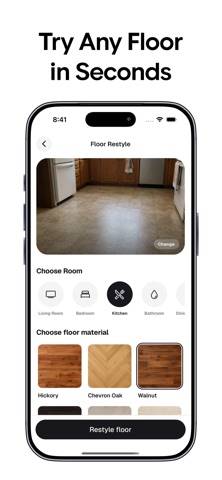
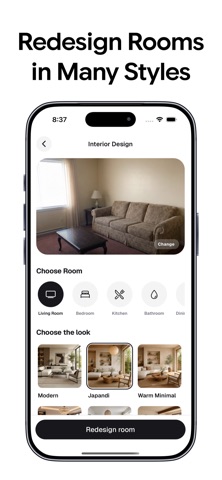
Redesign your home from a single photo. Casora is an AI home design app for quickly visualizing better interiors, smarter layouts, fresh paint colors, new floors, exterior upgrades, garden ideas, and furniture changes before you spend money on a real renovation. Upload a photo of your room, exterior, or outdoor space. Pick a goal. Casora generates realistic design concepts based on your actual space so you can explore what works, compare styles, and save the ideas you love. Use Casora to: - Redesign bedrooms, living rooms, kitchens, bathrooms, offices, balconies, and more - Try popular interior styles like Modern, Japandi, Scandinavian, Luxury, Farmhouse, Mid-century, Organic Modern, Coastal, and Mediterranean - Preview exterior facade ideas and curb-appeal upgrades - Plan garden, backyard, patio, lounge, dining, pergola, lighting, privacy, poolside, and outdoor kitchen concepts - Test wall paint colors in seconds - Restyle floors with wood, stone, marble, tile, concrete, terrazzo, and other finishes - Replace furniture, lighting, rugs, tables, chairs, and decor with a guided brush tool - Clean up clutter and reveal a calmer version of your space - Apply a reference style image to your own room - Improve room layouts while keeping your space practical Two design modes help you control the result: Structural Preservation keeps the original room structure close to your photo. Renovation Design gives the AI more freedom to reimagine the space. Whether you are decorating a new apartment, planning a remodel, testing paint before buying samples, refreshing a listing, or simply looking for home decor inspiration, Casora helps you see the idea first. Your dream room, exterior, or garden is one photo away. Download Casora and start designing your home with AI. Terms of Use (EULA): https://www.apple.com/legal/internet-services/itunes/dev/stdeula Privacy Policy: https://casora.app/legal/privacy
Latest release
What’s New
Bug fixes and better user experience
Audience growth
Ratings growth
Baseline captured. Growth appears after the crawler observes a changed rating count.
Momentum comes from crawler snapshots for the tracked storefront. “Viral growth signal” means unusually fast recent rating gains; it is an indicator, not download data.
Price tracking
Price intelligence
First snapshot captured. The trend line starts after the next crawler price observation.
- First observed Aug 19, 2026 · 5:46 AM Free
Screenshots