About this app
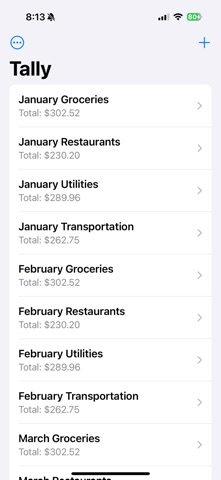
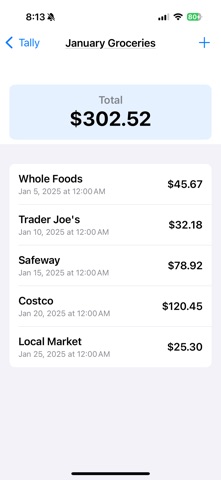
Meet "Category Tally" – Your Spending, Sorted! Say hello to Category Tally, the app that makes tracking your expenses as easy as a tap. Whether it’s groceries, gas, or gifts, keep tabs on your spending with custom categories and a running total—all in one simple, satisfying place. How It Works: Kick Things Off: Open Category Tally and hit the "+" to create your first category—like "Groceries." Build Your List: Tap in, add an amount (maybe $25 at Randall’s), jot an optional note, and watch it stack up. Stay in the Know: Pop back anytime to see every entry, neatly lined up, with a total that tells the full story. Why You’ll Love It: Effortless Design: A clean homepage with your categories, no fluff—just what you need. Kept Local: Stored in JSON on your device—fast, private, and always there. Tailored to You: From daily buys to big spends, tally what matters most. Download Category Tally now and turn your expenses into a clear, organized tale. One category, one tap, total control.
Latest release
What’s New
Out of the ability to import and export.
Audience growth
Ratings growth
Baseline captured. Growth appears after the crawler observes a changed rating count.
Momentum comes from crawler snapshots for the tracked storefront. “Viral growth signal” means unusually fast recent rating gains; it is an indicator, not download data.
Price tracking
Price intelligence
First snapshot captured. The trend line starts after the next crawler price observation.
- First observed Sep 11, 2026 · 6:53 PM Free
Screenshots