About this app
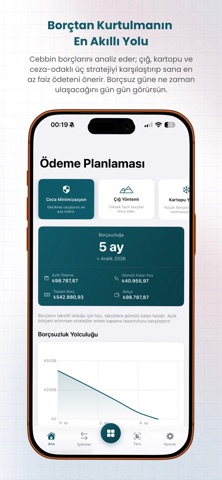
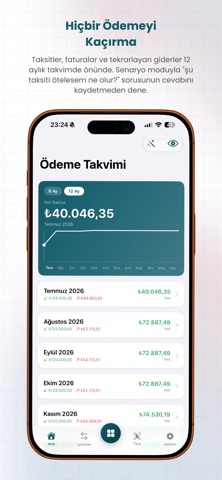
Cebbin combines your personal finances and small business in a single app, powered by AI. Most apps only manage budgets or only do basic accounting; Cebbin does both. Personal Finance - Track income and expenses by category. Recurring expenses like rent, subscriptions, and bills are automatically generated each month. - Break down installment payments; see your payment schedule and cash flow. - Set budget limits and receive alerts for overspends. Only expenses you actually pay are added to your budget. - Overdue and upcoming payments are always in front of you. AI - AI Debt Planner: Compares snowball, avalanche, and penalty-prevention strategies, and calculates your debt-free date. - Cebbin AI Chat: Ask questions based on your own data and receive personalized advice. - Smart insights: expense analysis and savings opportunities. Reports - Cash flow, profit/loss, category breakdown, and trends. - Projections for the coming month and the "where did the money go" flow breakdown. Markets & Portfolio - Watch live gold, currency, crypto, and stock prices. - Add your portfolio; see total value and profit/loss in real time. Business - Current account, VAT invoice, inventory, personnel (payroll & leave), tax calendar, checks/bills, fixed assets, cash, and bank accounts. Why Cebbin? - Personal budget + business + artificial intelligence in one place. - Multi-currency; records in different exchange rates are accurately collected. - Turkish, English, and German. Your data is securely stored, and your session is encrypted. Note: Market data and AI recommendations are for informational purposes only; they are not investment advice. Terms of Use: https://cebbin.com/en/terms-of-use Privacy Policy: https://cebbin.com/en/privacy-policy
Latest release
What’s New
- The Transactions list now flows from today backwards; future-dated entries are listed separately under the "Upcoming Payments" filter. - Month and year filters in Transactions. - Merchant comes first in entry titles ("BİM · Groceries"); tap a merchant name to see all its transactions. The home screen shows the same. - Add and edit your own expense and income categories (Settings > Categories). - New Portfolio card on the home screen. - Add a transaction quickly with Apple Shortcuts and Siri by saying the amount and category. - Upload a bank or credit card statement as PDF and import dozens of entries at once; installments, refunds and the statement period are detected automatically, and previously entered expenses are not duplicated. - Change the period of recurring income and expenses from the entry itself, and end a series with one tap. - Installment purchases get an automatic due date per installment; credit card installments no longer crowd Upcoming Payments. - Payment Planning now counts one-off incomes too. - AI insights, the payment calendar and chat use fresh data the moment you add income or expenses. - The fuel price pressure indicator is more accurate and updates more often. - All errors are shown as centered alerts. - Fixed: the error and duplicate goals when adding a savings goal, the setup screen getting stuck, AI insights staying in the old language after switching languages, and dates getting stuck in forms.
Audience growth
Ratings growth
Baseline captured. Growth appears after the crawler observes a changed rating count.
Momentum comes from crawler snapshots for the tracked storefront. “Viral growth signal” means unusually fast recent rating gains; it is an indicator, not download data.
Price tracking
Price intelligence
First snapshot captured. The trend line starts after the next crawler price observation.
- First observed Sep 17, 2026 · 4:04 AM Free
Screenshots