About this app
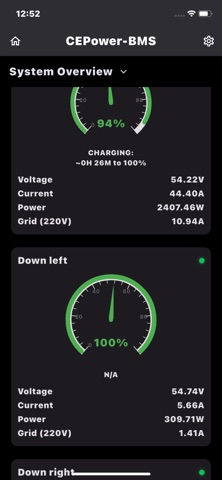
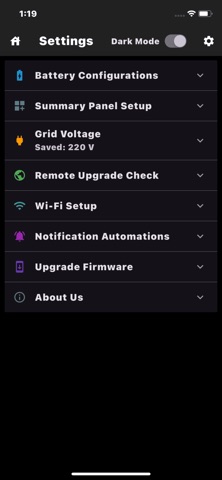
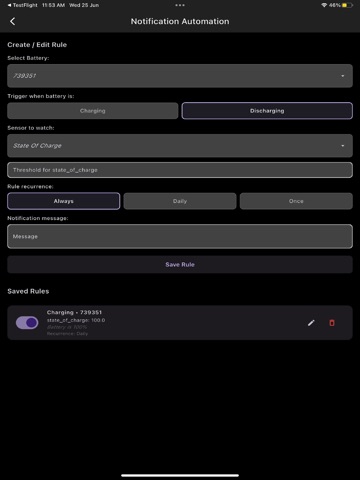
CEPOWER Battery Monitor – JK & JBD BMS Real-Time Monitoring App Monitor your JK & JBD lithium battery systems in real time via Wi-Fi — over Bluetooth or UART — through ESP32 modules. CEPOWER gives you full visibility into your battery performance — anywhere, anytime. REAL-TIME MONITORING - Track cell voltages, total voltage, current, temperature, and more - Works with JK BMS and JBD / Overkill Solar BMS via ESP32 - Supports Bluetooth and UART / RS485 connection to the BMS - Supports up to 20 batteries modules per user WI-FI & BMS CONNECTIVITY - Requires any ESP32 module with Wi-Fi - Connects to your BMS via Bluetooth or UART / RS485 - Automatically fetches data every 10 seconds - Handles reconnection automatically in case of Wi-Fi or BMS communication issues - Easy Wi-Fi setup through the app without needing a computer NOTIFICATION ALERTS - Create your own battery alerts with flexible options - Select which battery to monitor and define custom conditions - Add, edit, or delete alerts at any time from the app - Alerts are pushed to your phone even when the app is closed or running in the background - Works seamlessly on both Android and iOS - Alerts can be based on SOC, individual cell voltages, total voltage, current, and more AUTOMATION WITH EWELINK & SONOFF - Connect your battery monitoring to real-world actions via eWeLink - Trigger any Sonoff smart device automatically based on battery conditions - Set automation rules using any available sensor — SOC, cell voltage, current, temperature, and more - Example: turn off a load when SOC drops below 20%, or activate a charger when voltage is low - Works in the background — no manual intervention needed ADMIN TOOLS AND OTA SUPPORT - Do you install or build batteries? This app is the perfect tool for your workflow - Admin login lets you view and manage all your customers' battery device IDs - Monitor multiple device IDs remotely from several clients - Combine multiple batteries under one client to track total consumption - Real-time monitoring for any of your clients, anytime, anywhere - Access 15 days of historical battery data with graphs and logs - History is available in multiple languages with time zone selection - Perform OTA firmware upgrades with version control and remote triggering - Remotely modify BMS parameters for any of your clients' devices — available on business accounts MULTIPLE LANGUAGES CEPOWER is available in 23 languages - Use the app in English, French, Arabic, German, Spanish, Hindi, Hungarian, Italian, Portuguese, Russian, Vietnamese, Chinese, Polish, Romanian, Czech, Bulgarian, Slovak, Croatian, Slovenian, Lithuanian, Latvian, Estonian, and Ukrainian - Localized menus, alerts, automation settings, history, battery information, and device activation - Arabic includes right-to-left layout support - Language can be changed easily from the app settings CROSS-PLATFORM EXPERIENCE - Works on Android, iOS, web, and Windows PC - Lightweight, fast, and user-friendly - Designed for solar professionals, battery installers, and everyday users Requires a Device-ID Number provided by us to connect to your battery. You can try the app live using one of our demo batteries — no setup needed. Call or email us for more information. (support@cepower.org)
Latest release
What’s New
• Added support for 11 Eastern European languages: Polish, Romanian, Czech, Bulgarian, Slovak, Croatian, Slovenian, Lithuanian, Latvian, Estonian, and Ukrainian. • Improved Device ID validation for permanent and trial devices. • Added a direct activation link with automatic Device ID entry. • Fixed chart gesture, zoom, tooltip, and mobile display issues. • General stability and usability improvements.
Audience growth
Ratings growth
Baseline captured. Growth appears after the crawler observes a changed rating count.
Momentum comes from crawler snapshots for the tracked storefront. “Viral growth signal” means unusually fast recent rating gains; it is an indicator, not download data.
Price tracking
Price intelligence
First snapshot captured. The trend line starts after the next crawler price observation.
- First observed Aug 19, 2026 · 5:14 AM Free
Screenshots