About this app
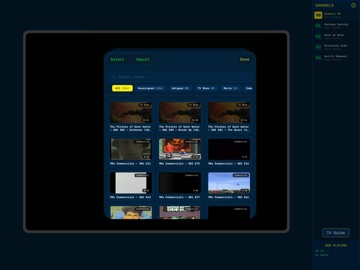
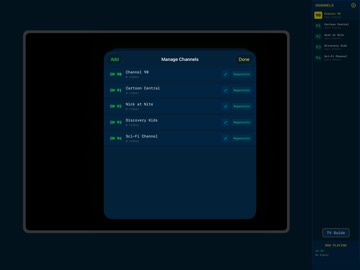
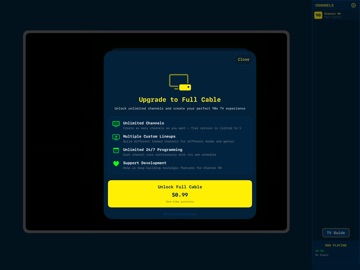
Turn your iPad into a 90s TV set. Channel 90 takes the videos you already own and broadcasts them as real channels — running around the clock, on a schedule, whether you're watching or not. Tune in and something is already playing, halfway through. Just like it used to be. LOAD YOUR TAPES Import your own MP4, MOV, M4V and 3GP videos from the Files app, your Photos library, or by dragging them over from a computer. Classic cartoons, old home movies, vintage commercials — whatever you've got on hand. PROGRAM THE SCHEDULE Group your videos into custom-named channels. Channel 90 builds each one a continuous 24/7 schedule, so switching over drops you into the middle of whatever is on right now — not back at the start of a playlist. Don't like the running order? Regenerate it and get a fresh one. SURF'S UP Swipe to change channels, with a satisfying burst of static between each flip. Half the fun is not knowing what you'll land on. REMEMBER COMMERCIALS? Mark clips as commercials and they'll slot themselves into the breaks between programs — one or two at a time, exactly like the real thing. Leave them off a channel and it plays straight through. CHECK THE GUIDE One tap opens a proper scrolling TV guide, showing what's on now and what's coming up across every channel you've built. LIVE STREAMS TOO Point a channel at an Owncast server or any .m3u8 (HLS) URL and it sits right alongside your own tapes — 24/7 retro TV streams, internet radio, or your own broadcast. Owncast streams even show what's currently playing. DIAL IN THE PICTURE Scan lines you can tune, brightness, contrast, tint and color, three screen sizes, and your choice of 4:3, widescreen or fullscreen. Plus a set of color themes to match the era you're going for. PLEASE NOTE — BRING YOUR OWN TAPES Channel 90 is your personal TV station, which means you supply the programming. It does not come with any TV shows, movies, or commercials. It's a player for the video files you already have, plus any live streams you point it at. FREE VS FULL CABLE The free version runs one channel, so you can build a lineup and try the whole experience end to end. A one-time Full Cable purchase unlocks unlimited channels. It's also a great second life for an older iPad sitting in a drawer. Grab a snack, get comfortable, and see what's on.
Latest release
What’s New
NEW: THEMES Fifteen new looks — and they don't just retint the TV, they recolor the whole app. CLASSIC 90s Cable Box — the original: deep navy, yellow bezel, green readout Saturday Morning — candy cartoon-block magenta and cyan Late Night — warm amber phosphor and wood panel Test Pattern — SMPTE color bars on black Miami — art-deco teal and flamingo 8-Bit — four-shade pea-green handheld LCD 16-Bit — vivid console colors on grey-purple Broadcast — early-90s newsroom navy, gold and red MODERN Midnight, Vaporwave, Aurora, Daylight, Terminal PLAIN Onyx and Paper, for when you just want to watch Find them in Settings → Appearance. Every option previews itself in its own colors before you pick it. ALSO NEW • Picture shape — choose 4:3, widescreen or fullscreen, so 16:9 recordings no longer sit letterboxed inside a square frame • Your picture settings finally stick. Scan lines, brightness, contrast, tint, color and screen size all survive a restart • TV Guide and Settings are now reachable from the on-screen controls, including in fullscreen • Live stream channels show what's actually playing right now, with an on-air indicator • Long channel names wrap in the sidebar instead of being cut off FIXED • Channels keep broadcasting. A channel used to drop to "No Signal" once it had played through its schedule — it now loops continuously, the way it always should have • The TV Guide shows the right program. The now-line and the listings are properly aligned, and the channel column scrolls with its rows • Nothing gets deleted behind your back. Videos whose files can't be read are flagged in your library instead of being removed • Regenerate genuinely reshuffles the running order every time • A stream that won't connect now tells you why and offers a retry, instead of showing static forever • Volume starts at full, remembers where you left it, and the on-screen readout tracks your finger • Importing shows progress, tells you if anything was skipped, and checks you have room first • Much easier on the battery — the static effect and the TV Guide are dramatically cheaper to draw • Better VoiceOver support, and text now scales with your system text size
Audience growth
Ratings growth
Baseline captured. Growth appears after the crawler observes a changed rating count.
Momentum comes from crawler snapshots for the tracked storefront. “Viral growth signal” means unusually fast recent rating gains; it is an indicator, not download data.
Price tracking
Price intelligence
First snapshot captured. The trend line starts after the next crawler price observation.
- First observed Aug 20, 2026 · 12:55 AM Free
Screenshots