About this app
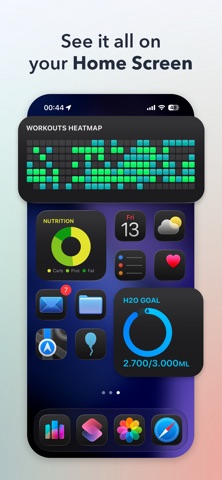
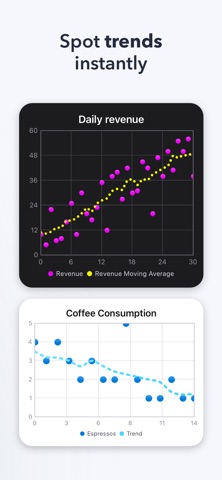
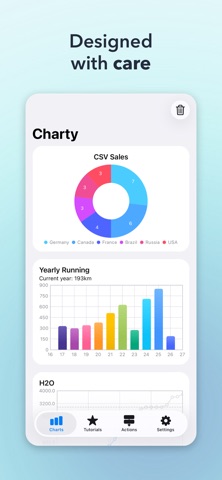
Charty is the ultimate charting companion for Shortcuts. Whether you're tracking workouts, visualizing health data, monitoring budgets, or building dashboards from any app on your iPhone or iPad — Charty makes it effortless to go from raw numbers to beautiful, shareable charts. CREATE CHARTS YOUR WAY Build bar charts, line graphs, scatter plots, area charts, pie charts, donut charts, and ring charts — all from Shortcuts automations you already use. Combine multiple data series, customize every detail, and see your data come to life. STUNNING WIDGETS ON YOUR HOME SCREEN Display your charts as widgets that update automatically. Track your goals, habits, fitness progress, or anything else — right from your Home Screen. POWERFUL DATA TOOLS Go beyond simple plotting. Group, filter, and accumulate values. Add moving averages and trend lines. Import data from CSV files. Export charts as high-resolution images to share or save. STYLE EVERYTHING Fine-tune colors, markers, axis labels, date formats, floating-point precision, and more. Apply custom themes to keep your charts consistent and polished. Stack bars, customize line thickness, and highlight the data that matters most. LEARN AS YOU GO Access 16 built-in tutorials that walk you through creating your own Shortcuts — from simple charts to advanced data workflows. No coding required. FREE TO START Create unlimited charts with up to 2 series per chart — completely free. Unlock Charty Premium to access all 25 Shortcuts actions, unlimited series, full styling controls, area charts, CSV import, image export, widgets, and more. Terms of Use (EULA): https://www.apple.com/legal/internet-services/itunes/dev/stdeula/
Latest release
What’s New
Charty 2.0 is a complete rebuild from the ground up. Here's what's new: - Fully rebuilt on SwiftUI using Apple's Swift Charts for more beautiful, customizable charts - More reliable widgets - New color themes and gradient support - Revamped Tutorials tab with downloadable example shortcuts and integrations with Data Jar, Toolbox Pro, Reminders, and more - Your existing shortcuts and charts will migrate seamlessly (color themes may need to be recreated) Pricing change: Charty is moving to a subscription model at $0.99/month or $9.99/year. If you've ever purchased Charty Premium, you keep full access to everything in 2.0 at no extra cost. Heads up: Localizations in French and Spanish and video tutorials have been temporarily removed. English and Portuguese only at launch, with other localizations returning in future updates.
Audience growth
Ratings growth
Baseline captured. Growth appears after the crawler observes a changed rating count.
Momentum comes from crawler snapshots for the tracked storefront. “Viral growth signal” means unusually fast recent rating gains; it is an indicator, not download data.
Price tracking
Price intelligence
First snapshot captured. The trend line starts after the next crawler price observation.
- First observed Aug 19, 2026 · 7:03 PM Free
Screenshots