About this app
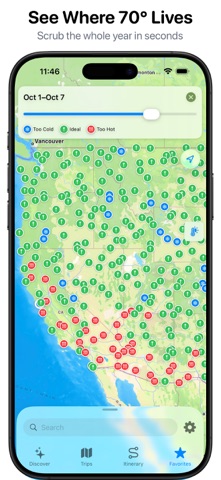
Chasing 70 Degrees — RV Trip Planner & Weather Map The perfect weather is always somewhere. Chasing 70 Degrees helps you find it — then turns it into a real road trip. Scrub through the entire year and watch where comfortable temperatures live across the country, week by week. Found your ideal 70-degree window? Build the route to get there, with smart overnight stops, curated trip ideas, and expense tracking all in one place. FIND THE PERFECT WEATHER • Scrub through any week of the year and see where ideal temperatures are — anywhere in the country • Temperature and weather map overlays show conditions at a glance • Monthly comfort view helps you pick the best time to travel • Stop guessing — plan around the weather you actually want PLAN YOUR ROUTE • Build RV and road-trip routes with overnight stops • The drive-radius ring shows how far you can comfortably go in a day • Add day stops and "on the way" stops along your drive • See your whole itinerary come together on the map START FROM CURATED TRIPS • Browse ready-made routes in Discover, like the Southwest Loop • Import a curated trip and make it your own • Or build a trip from scratch, your way SAVE YOUR FAVORITE PLACES • Tag and organize every spot you'd love to visit • From national parks to that diner a friend won't stop talking about • Keep all your dream destinations in one place TRACK YOUR SPENDING • Log trip expenses by category • See where your travel budget is going • Keep every trip's costs organized SYNC EVERYWHERE • Your trips, favorites, and plans sync across your devices • Pick up right where you left off Whether you're chasing 70 degrees in an RV, a van, or a car, this is the easiest way to plan a trip around the weather you actually want. Download Chasing 70 Degrees and start planning your perfect-weather road trip today. Terms of Use (EULA): https://www.apple.com/legal/internet-services/itunes/dev/stdeula/
Latest release
What’s New
Reporting, rebuilt. Spending and nights now live in their own Reporting tab. Pick any date range or a single trip and get the same breakdown either way — so a trip can be however long it needs to be without throwing off your numbers. • New Reporting tab replaces Itinerary • Your active trip is now pinned to the top of the Trips tab, one tap away • Trip expenses have been reworked with a clearer ledger Booked or tentative • Mark any overnight stop as booked, and see it at a glance in your stop list • Booking status carries through to your synced calendar, so you can tell a confirmed night from a maybe without opening the app Stops know where they are • Stops now keep their street address and city • Calendar events carry a real location, so they open properly in Maps • Search matches on address, not just name Categories that fit the screen you're on • The stop picker offers place categories; the expense picker offers spending categories • Archive a category to hide it from both without stripping labels off your history Also in this release • Overnight stops are marked in the stop list, and stops show their end date • Bookings can span dates across multiple trips • Faster map, search, and weather loading • Fixed: default date on new stops, keyboard dismissal, the active tab now persists, and non-overnight stops no longer attach to the wrong stop
Audience growth
Ratings growth
Baseline captured. Growth appears after the crawler observes a changed rating count.
Momentum comes from crawler snapshots for the tracked storefront. “Viral growth signal” means unusually fast recent rating gains; it is an indicator, not download data.
Price tracking
Price intelligence
First snapshot captured. The trend line starts after the next crawler price observation.
- First observed Aug 27, 2026 · 1:09 AM Free
Screenshots