About this app
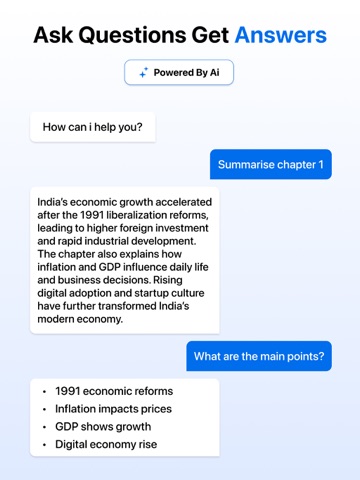
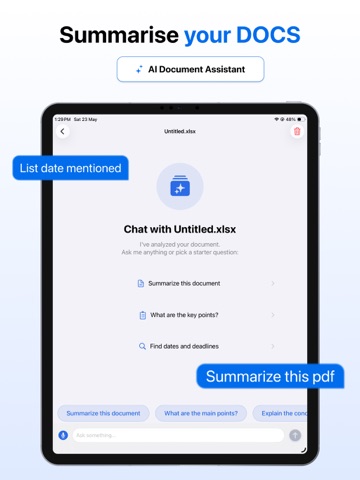
Read smarter. Find answers faster. Chat with your documents in seconds. Reading long files shouldn’t take hours. Chat With Documents lets you instantly understand PDFs, spreadsheets, reports, notes, and more by simply asking questions. Upload any document, chat naturally with your files, and get accurate answers, summaries, and key insights within seconds. Whether you're studying, working, researching, or managing files daily, Chat With Documents helps you save time, stay organized, and work more efficiently. Why Users Love Chat With Documents • Ask questions and get instant answers from your files • Summarise lengthy documents in seconds • Extract key points and important insights effortlessly • Search large files without endless scrolling • Understand complex reports, research papers, and data faster • Simple, clean, and productivity-focused experience Chat With Any Document Interact with your files like a conversation. • Ask anything about your document • Get clear answers instantly • Find important information fast • Understand content without reading every page • Analyze reports, notes, contracts, and study materials easily Supports Multiple File Formats More than just PDFs — open and chat with multiple document types in one app: • PDF documents • TXT text files • CSV data files • XLSX spreadsheets • XML documents • RTF files • And many more supported formats No need to switch between different apps to view or analyze files. Smart AI-Powered Insights Turn complex documents into simple answers. • Generate quick summaries • Extract important information instantly • Review study notes and research faster • Analyze business reports with ease • Save hours of manual reading and searching Perfect For • Students reviewing study materials • Professionals analyzing reports and files • Researchers reading papers and datasets • Teams managing large documents • Anyone who wants faster document understanding Privacy & Security First Your privacy matters. • Files are handled securely and responsibly • Documents are processed only to provide answers and insights • Designed with user privacy and security in mind Why Choose Chat With Documents • Chat with your files instantly • Supports multiple file formats • Fast AI-powered document understanding • Easy-to-use and modern interface • Built for productivity, learning, and efficiency Upload your document. Ask questions. Get answers instantly. Unlimited document uploads are available with an active paid subscription, allowing you to upload and chat with as many PDFs and supported files as you need without restrictions. Privacy Policy: https://swiftybrains.com/privacy-policy/ Terms of Use: https://swiftybrains.com/terms-of-use/ Support: contact.swiftybrains@gmail.com
Latest release
What’s New
Minor Bug and Performance Fixes.
Audience growth
Ratings growth
Baseline captured. Growth appears after the crawler observes a changed rating count.
Momentum comes from crawler snapshots for the tracked storefront. “Viral growth signal” means unusually fast recent rating gains; it is an indicator, not download data.
Price tracking
Price intelligence
First snapshot captured. The trend line starts after the next crawler price observation.
- First observed Aug 8, 2026 · 5:58 PM Free
Screenshots