About this app
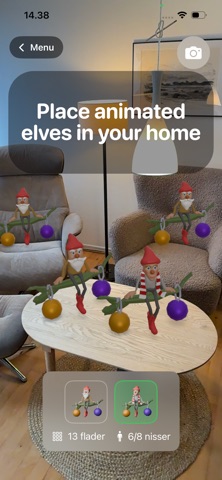
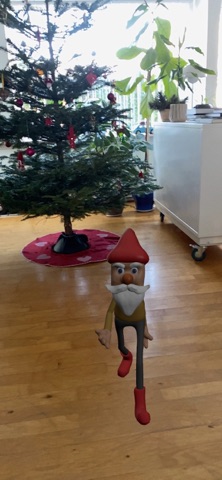
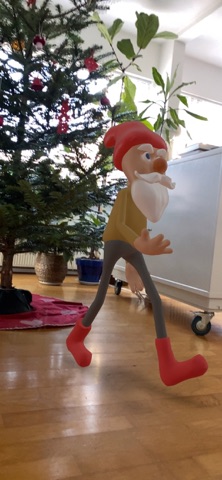
Bring the Christmas spirit into your home with Christmas Elves AR - the ultimate AR experience for the whole family! Place animated elves in your home Use your iPhone or iPad's camera to place charming, animated elves anywhere in your home. Watch them sit on pine branches with Christmas ornaments, swinging their legs in true Christmas spirit! Two different elves Choose between Father Elf and Mother Elf, both with unique animations. Place up to 8 elves at once for the perfect Christmas scene. Walking Elf Mode - NEW! Watch Father Elf walk around your home! Place waypoints on the floor and see the elf wander between them in a continuous loop. Perfect for creating lively Christmas scenes! Magical effects • Tap an elf to see magical light effects with romantic hearts • Hear Christmas sounds and chimes • Take photos of your elves and share them with family and friends Easy to use The app uses Apple's ARKit technology to scan your floor and find the perfect placements. The elves stay where you place them, so you can walk around and see them from all angles. Family-friendly Perfect for children and adults during the Christmas season. Create magical moments and traditions together with your loved ones. Features: • Augmented Reality (AR) integration • Two animated elf models (Father Elf & Mother Elf) • Walking Elf mode with waypoint system • Magical light and sound effects with romantic hearts • Take and share photos • Intuitive controls • No ads • No in-app purchases The elves are waiting to come home to you! Download now and start your magical Christmas AR experience.
Latest release
What’s New
Major Update - Walking Elf Mode! NEW: • Walking Elf mode - watch Father Elf wander around! • Place waypoints and see elf walk between them • Continuous loop animation • Camera function in Walking Mode • Romantic heart effects IMPROVEMENTS: • Updated UI with icon-only buttons for better space • Stabilized movement (no drift) • Undo waypoint function • Support for up to 10 waypoints Merry Christmas!
Audience growth
Ratings growth
Baseline captured. Growth appears after the crawler observes a changed rating count.
Momentum comes from crawler snapshots for the tracked storefront. “Viral growth signal” means unusually fast recent rating gains; it is an indicator, not download data.
Price tracking
Price intelligence
First snapshot captured. The trend line starts after the next crawler price observation.
- First observed Aug 11, 2026 · 5:01 AM Free
Screenshots