About this app
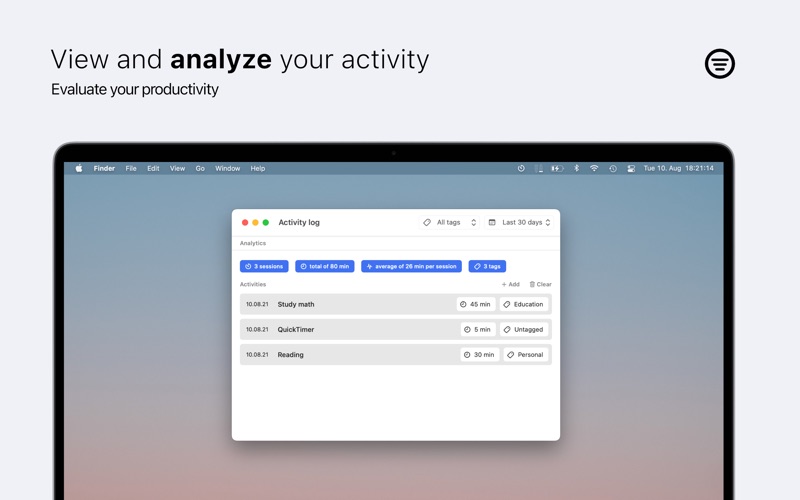
Chrono makes creating timers easy and fast! Simply execute a custom defined global shortcut or use the menu to start a new countdown timer. Great for time boxing to boost your productivity. Afterwards, you can analyze what you have been working on in the log view. Additionally user-definable QuickTimers available. • Specify optionally a title and tag for timers • See the remaining seconds and the title of the timer in the menu bar • Receive a notification or an alert when the timer ends • Customisable QuickTimers that can be started via a custom shortcut or from the menu • Extend timers if needed • View, filter and analyze your recent timers • Launch at login option Boost your productivity by starting a timer for each task you want to accomplish and define how long you want to be working on that. See the time left counting down in the menu bar and take advantage of Parkinson's law (work expands to fill the time available for its completion).
Latest release
What’s New
This update focuses on enhancing QuickTimers • Fixes a bug that caused a bad title in the menu for QuickTimers Version 1.2 This update focuses on enhancing QuickTimers • Customise the duration of QuickTimers in the settings • Assign custom defined global keyboard shortcuts to QuickTimers, so you can start them even faster • When manually stopping a timer, you can now choose in the menu whether the timer should be logged or canceled • Other minor improvements Thank you for using Chrono - Menu Bar Timer
Audience growth
Ratings growth
Baseline captured. Growth appears after the crawler observes a changed rating count.
Momentum comes from crawler snapshots for the tracked storefront. “Viral growth signal” means unusually fast recent rating gains; it is an indicator, not download data.
Price tracking
Price intelligence
First snapshot captured. The trend line starts after the next crawler price observation.
- First observed Sep 18, 2026 · 2:10 AM $1.99
Screenshots