About this app
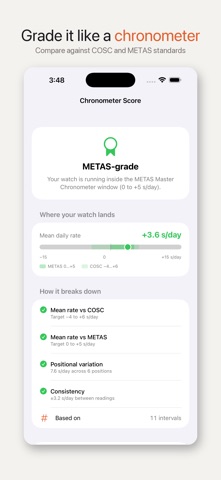
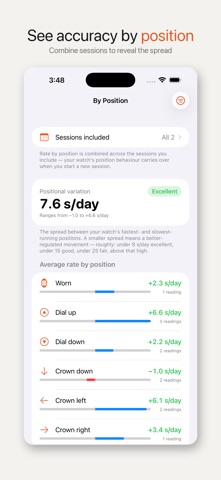
A pro watch timing machine — right in your pocket. Chronograde reads any mechanical watch's rate and beat error through your iPhone mic, then tracks each watch's daily drift against atomic time. No dock, no $1,000 instrument. The Timegrapher is free for everyone, with no account. Chronograde Pro removes every ad and unlocks the rest. TIMEGRAPHER — LISTEN TO YOUR WATCH - Rest the phone on the caseback and Chronograde "hears" the balance wheel - Live rate in seconds per day, plus beat error in milliseconds - Automatic beat-rate (BPH) lock-on, or set it yourself - The same spectral-flux signal processing real timegrapher software uses — all on your iPhone or iPad ATOMIC-TIME ACCURACY TRACKING - Record a reading when your watch shows a target time — down to the exact second — and Chronograde compares it to NTP-synced atomic time - Get a signed offset and a rate in seconds per day, charted over days and weeks - Time synced from public NTP servers (Apple, Google, NTP Pool) - Works offline using your last sync or device clock (clearly labeled) ACCURACY BY POSITION - Tag how the watch was kept for each reading — worn, dial up, crown down, and more - See how the rate changes with position and the positional variation — the "delta" watchmakers use to judge regulation (Chronograde Pro) - Combine multiple sessions to see the average rate by position over your watch's life (Chronograde Pro) YOUR COLLECTION - Unlimited watches with photos, brand, model, reference, serial, caliber - A per-session drift chart for each watch — start a fresh session after a service or reset (Chronograde Pro) - Sort by rate, last measured, last worn, or recently added - Color-coded rate: green within ±10 s/day, orange to ±30, red beyond WEAR & SERVICE (Chronograde Pro) - One tap to log today's wear; days worn in the last 30 or 365 at a glance - Full service history with provider, cost, and notes - Set a service interval and Chronograde shows when the next one is due ATOMIC CLOCK (Chronograde Pro) - Large NTP-corrected clock face for setting your watch, analog and digital DATA YOU OWN - Optional iCloud sync across iPhone and iPad via your Apple ID - Export your full collection to Excel or CSV; import watches from CSV (Chronograde Pro) FREE TO START - The Timegrapher is free for everyone — measure any watch's rate and beat error at no cost, with no account - Record up to 10 accuracy measurements free, and keep your whole collection - The free tier is supported by ads. They never cover the controls and never interrupt a measurement — and Chronograde Pro removes them entirely GO PRO WHEN YOU'RE READY - Chronograde Pro removes every ad, and adds unlimited measurements and sessions, Regulation Coach, Accuracy by Position, your Chronometer Score, the Atomic Clock, wear & service logs, and export to CSV & Excel - Monthly or annual subscription, each with a 7-day free trial — cancel anytime, and nothing is charged during the trial - Prefer to pay once? A one-time Lifetime unlock gives you Pro forever — no subscription Made for watch enthusiasts who care about the seconds. --- Subscription details: Chronograde Pro is offered monthly or annually after a 7-day free trial. Renews automatically until cancelled in Settings > Apple ID > Subscriptions at least 24 hours before the next billing date. Payment is charged to your Apple ID. Terms: https://www.apple.com/legal/internet-services/itunes/dev/stdeula/ Privacy: https://mwsupplylimited.github.io/chronograde/privacy.html
Latest release
What’s New
• Fixed: if your iCloud uploads had already stopped working before you updated, the sync screen still showed a green tick. It now says plainly when it can't confirm your uploads, and shows the date of the last one that actually left this device. This is the fix 1.6.3 was meant to be — thank you to the owner who kept checking. • The iCloud screen is no longer behind Chronograde Pro. Syncing is free for everyone, so knowing whether it is working should be free too. • "Sync Now" no longer reports that you're up to date while a sync error is showing directly above it, and VoiceOver now reads out the sync state instead of just "iCloud Sync". • Fixed: the average rate in exported CSV and Excel files was calculated straight through a session reset, so it could disagree with the app — sometimes by a lot. Both exports now match what you see on screen, and the per-watch CSV has gained a session column. • Fixed: exports numbered sessions differently from the app once you had deleted one, and the watch page could show two different numbers for the same session. • Fixed: the Home Screen widget could keep showing a renamed watch's old name, or the rate from a session you had just deleted. • Regulation Coach no longer reports "Excellent — tightly regulated" when it never managed to hear your watch, and no longer spends your free run when that happens. If microphone access is off it now says so and offers to open Settings. • Fixed: recording a measurement while atomic time couldn't refresh warned you it was using the phone's clock. It wasn't — your last known atomic offset was still being applied — and those readings are no longer marked unsynced. • Chronograde Pro subscribers are no longer briefly shown ads while the app checks their subscription at launch. • Importing a CSV that matches a watch in Recently Deleted now restores that watch and tells you, instead of merging into a hidden one. • Deleting a wear entry now updates "last worn" properly instead of leaving the old date behind.
Audience growth
Ratings growth
Baseline captured. Growth appears after the crawler observes a changed rating count.
Momentum comes from crawler snapshots for the tracked storefront. “Viral growth signal” means unusually fast recent rating gains; it is an indicator, not download data.
Price tracking
Price intelligence
First snapshot captured. The trend line starts after the next crawler price observation.
- First observed Aug 20, 2026 · 2:24 PM Free
Screenshots