About this app
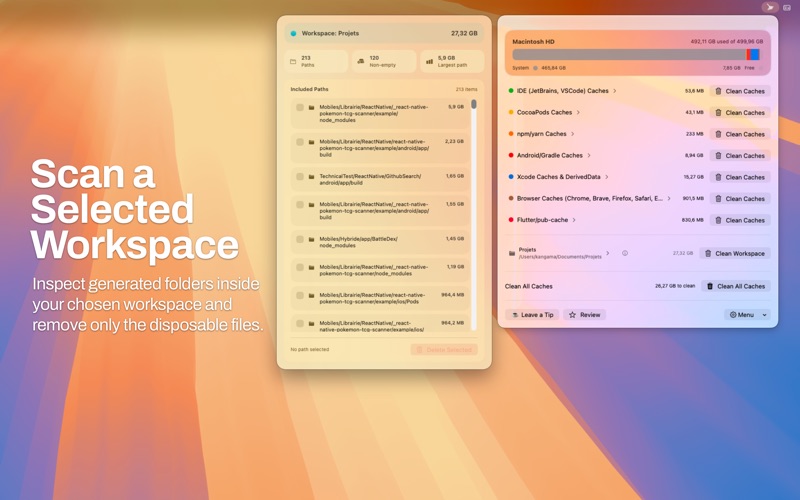
DevCacheCleaner helps developers free up disk space by finding and cleaning cache files, build artifacts, and generated folders that grow over time on macOS. Built for modern developer workflows, DevCacheCleaner scans common storage-heavy locations used by Xcode and other tools, then shows how much space you can recover before you delete anything. It is designed to make Mac storage cleanup simple, clear, and safe. With DevCacheCleaner, you can: - clean Xcode caches and DerivedData - remove old developer cache files stored in your Home folder - scan a selected workspace for generated folders and temporary build output - inspect storage usage before cleanup - choose exactly what you want to remove - clean multiple cache categories from one simple menu bar app DevCacheCleaner can help you identify and clean data created by tools and workflows such as: - Xcode and DerivedData - Swift Package Manager - Node.js and node_modules-related generated data - Android and Gradle caches - Flutter and other developer tool caches The app focuses on generated and disposable files, not your source code. Many cleaned files can be recreated later by your tools when needed. Why developers use DevCacheCleaner: - recover valuable disk space on smaller SSDs - keep development environments lighter and easier to manage - clean project-specific workspace caches without hunting through folders manually - get a fast overview of large cache categories in one place DevCacheCleaner also includes: - workspace path selection in Settings - Launch at Startup support - a built-in Help screen - a lightweight menu bar experience designed for quick maintenance DevCacheCleaner requires access to your Home folder to scan supported cache locations. Workspace access is optional and only applies to the folder you choose. If you want a developer cache cleaner for macOS that helps you clean Xcode caches, inspect storage usage, and manage workspace cleanup more easily, DevCacheCleaner gives you a focused and practical tool for the job.
Latest release
What’s New
DevCacheCleaner v0.8.5 expands cache coverage and improves cleanup precision. - Added more built-in cache categories for IDEs, package managers, languages, JVM tools, Xcode, browsers, and design apps. - Improved grouped cache paths with clearer names and better organization. - Added selective cleanup for grouped and nested cache paths. - Improved cleanup progress feedback by showing the path currently being deleted. - Added retry support for failed cleanup paths. - Restored workspace path persistence in Settings. - Improved accessibility, selection controls, and UI refinements.
Audience growth
Ratings growth
Baseline captured. Growth appears after the crawler observes a changed rating count.
Momentum comes from crawler snapshots for the tracked storefront. “Viral growth signal” means unusually fast recent rating gains; it is an indicator, not download data.
Price tracking
Price intelligence
First snapshot captured. The trend line starts after the next crawler price observation.
- First observed Aug 7, 2026 · 9:48 PM Free
Screenshots